Writing your first Power Automate flow test using Power Automate Mock-Up
Feb 22, 2021 • Thyge S. Steffensen
Tags: PAMU, Power Automate
What is Power Automate Mock-Up?
Power Automate Mock-Up is a framework that can execute Power Automate flows from their JSON description.
You can use PAMU to unit test Power Automate flows so that the logic can be ensured when moving flows from development through to production.
You can even let the citizen developer change a flow without worry about the core logic still being fulfilled because the error is caught before going to production.
The flow being tested
The first step is to create a simple flow. I have created a small flow, which I will use throughout this tutorial.
This flow is based on a colleague having trouble checking for empty string values when retrieving records from Dynamics.
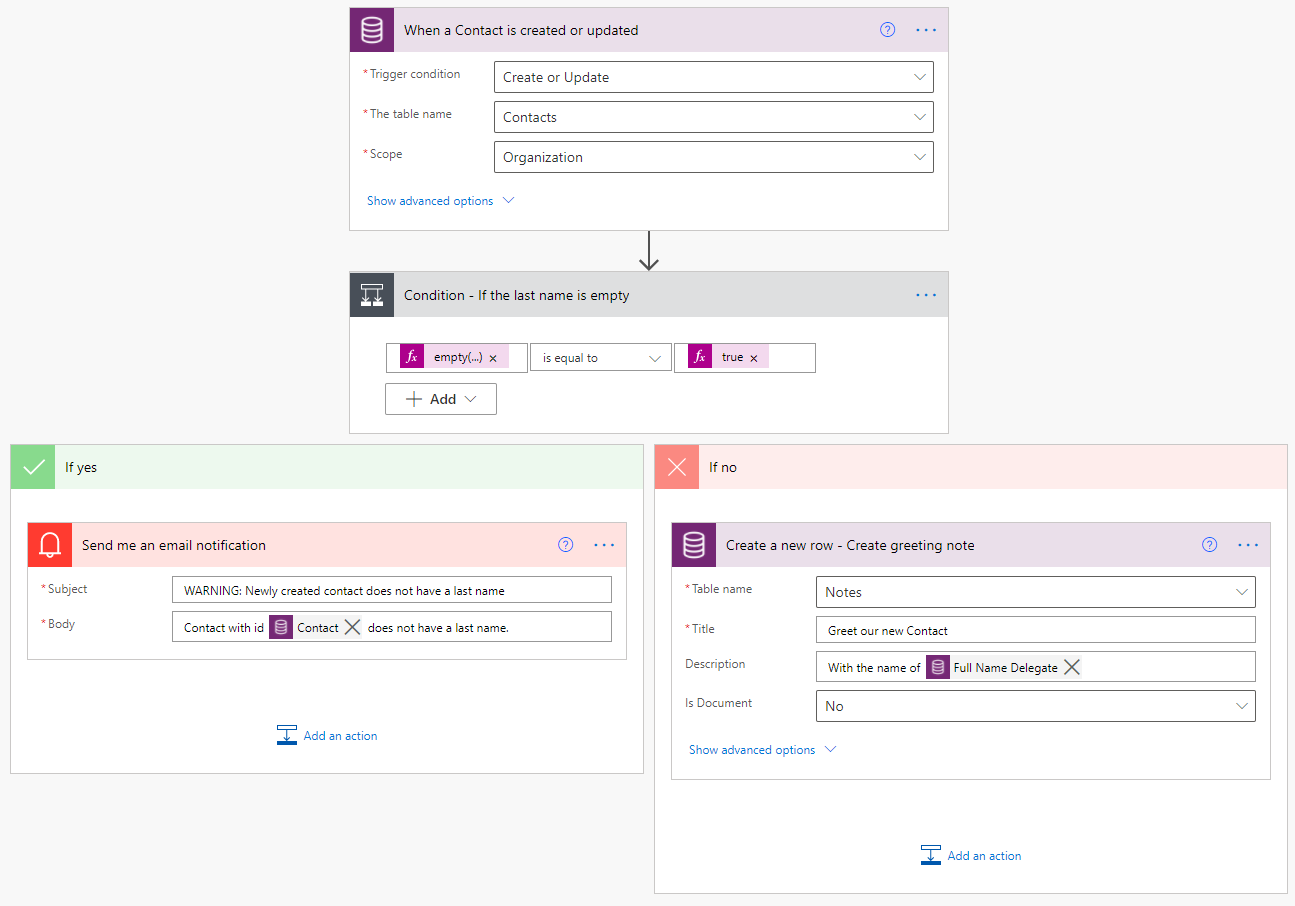
The flow JSON is available in the source code for the demonstration.
Create a new C# Test Project
Using a preferred editor, create a new C# solution and create a test project using either .NET Core 3.1 or .NET Framework 4.6.2 or 4.8.
Add the Power Automate Mock-Up nuget to the project.
Create a new unit test and add the following Setup function (I’m using NUnit, but this will work in every framework).
[SetUp]
public void Setup()
{
    var serviceCollection = new ServiceCollection();
    serviceCollection.AddFlowRunner();

    serviceCollection.Configure<FlowSettings>(x => { x.FailOnUnknownAction = false; });

    _serviceProvider = serviceCollection.BuildServiceProvider();
}
var serviceCollection = new ServiceCollection(); and serviceCollection.AddFlowRunner(); initializes a new service collection and adds the needed dependencies from PAMU in order to execute a flow.
serviceCollection.Configure<FlowSettings>(x => { x.FailOnUnknownAction = false; }); will create a flow setting object, telling PAMU to ignore actions without an Action executor.
_serviceProvider = serviceCollection.BuildServiceProvider(); will build the service provider and we’re ready to execute our flow.
Create the unit test
Set up
Everything has been set up, and we’re ready to write our first test. The test is structured in the AAA (Arrange, Act, Assert) pattern, we will start with the following:
[Test]
public async Task Test()
{
    // Arrange
    var flowPath =
        new Uri(System.IO.Path.GetFullPath(@"flows/2752dde1-2bb2-4e63-9273-a4f82de375f2.json")); // The path to the downloaded flow JSON file

    var flowRunner = _serviceProvider.GetRequiredService<IFlowRunner>();
    flowRunner.InitializeFlowRunner(flowPath.AbsolutePath);

    // Act
    var flowResult = await flowRunner.Trigger();

    // Assert
}
The above snippet sets up the flowrunner for the given flow and executes the flow.
We start by acquiring the JSON file path, then we retrieve the flow runner from the Service provider and initialize the flow.
When initializing the flow, the flow JSON is parsed, and a list of all actions is retrieved. We are now ready to run the flow. This is done by using the async function Trigger().
Nothing will happen, we are ignoring all unknown actions, and the trigger does not have any input. An error is thrown since PAMU expects some output from the trigger.
There are two ways to add output from the trigger. Either by adding a trigger action, which will provide trigger output, or provide it as a parameter to Trigger().
We will change await flowRunnerTrigger() with:
await flowRunner.Trigger(new ValueContainer(new Dictionary<string, ValueContainer>
{
    {
        "body", new ValueContainer(new Dictionary<string, ValueContainer>
        {
            {"contactid", new ValueContainer(Guid.NewGuid())},
            {"fullname", new ValueContainer("John Doe")},
            {"lastname", new ValueContainer("Doe")}
        })
    }
}));
The flow will be triggered with the provided trigger output.
Assert
Because the flow is triggered with input, we can check the input for a given action. This is usefull in a couple of ways:
- You can assure that a given action will get the required paramters to function
- You can assert the paramters to the function and not depend on the action to be implemented
// Assert
// Action is expected to have been executed
Assert.IsTrue(flowResult.ActionStates.ContainsKey("Create_a_new_row_-_Create_greeting_note"));

// Action is expected to not have been executed
Assert.IsFalse(flowResult.ActionStates.ContainsKey("Send_me_an_email_notification"));

// Checking action input parameters
var greetingCardItems =
    flowResult.ActionStates["Create_a_new_row_-_Create_greeting_note"].ActionInput?["parameters"]?["item"];
Assert.IsNotNull(greetingCardItems);
Assert.AreEqual(expectedNoteSubject, greetingCardItems["subject"]);
Assert.AreEqual(expectedNoteText, greetingCardItems["notetext"]);
A test is now set up and you are ready to test a flow, given it is simple and only uses values from the flow’s trigger. To enalbe actions to be executed or to return output to use in other action, we have to add an action executor.
Action executor
An action executor is the logic for an given action. In genereal there is a 1:1 relationship between action executors and actions in Power Automate. The simpliet form for an action executor is:
public class SendEmailNotification : DefaultBaseActionExecutor
{
    public const string FlowName = "Send_me_an_email_notification";

    public override Task<ActionResult> Execute()
    {
        return Task.FromResult(new ActionResult());
    }
}
This action executor does nothing, other than succeed. If we recall the real action from Power Automate, the action does not return anything either, so implementing this action is not fun.
Let us instead look at the Common Data Service action. This is a action which returns output and maybe also uses some logic.
public class CreateGreetingNote : OpenApiConnectionActionExecutorBase
{
    public CreateGreetingNote(IExpressionEngine expressionEngine) : base(expressionEngine)
    {
    }

    public override Task<ActionResult> Execute()
    {
        var guid = Guid.NewGuid();
        var subject = Inputs["paramters"]["subject"];
        var text = Parameters["text"]; // Parameters is equivalent to Inputs["parameters"]

        return Task.FromResult(new ActionResult
        {
            ActionOutput = new ValueContainer(new Dictionary<string, ValueContainer>
            {
                {"body/annotationid", new ValueContainer(guid.ToString())},
                {"body/subject", new ValueContainer(subject)},
                {"body/notetext", new ValueContainer(text)}
            })
        });
    }
}
In the above action executor we extend OpenApiConnectionActionExecutorBase which preprocesses the action JSON, making it easy availible for us, through Inputs and Parameters. It the builds the output value container, following the expected format.
If you want to simulate a CDS database locally to store created records, you can create your DBClass, add it to dependency injection and depend on it in the action executor, like:
public CreateGreetingNote(IExpressionEngine expressionEngine, CdsDbMock cdsMock)
    : base(expressionEngine)
    {
        _cdsMock = cdsMock;
    }
… or if you already use XrmMockup, you can use PAMU_CDS, which already works with XrmMockup.
You should now be ready to create simple unit tests for your flows.
The source code used in this post is available at here.
Please create an issue if you have a comment - and then I'll know I have to prioritize comment functionality