<?xml version="1.0" encoding="utf-8"?><feed xmlns="http://www.w3.org/2005/Atom" ><generator uri="https://jekyllrb.com/" version="3.10.0">Jekyll</generator><link href="https://blog.thygesteffensen.dk//feed.xml" rel="self" type="application/atom+xml" /><link href="https://blog.thygesteffensen.dk//" rel="alternate" type="text/html" /><updated>2026-04-18T06:27:23+00:00</updated><id>https://blog.thygesteffensen.dk//feed.xml</id><title type="html">Thyge Steffensen</title><subtitle>Brief description</subtitle><entry><title type="html">Thinking required… - part 2</title><link href="https://blog.thygesteffensen.dk//2026/04/12/Thinking-required-2.html" rel="alternate" type="text/html" title="Thinking required… - part 2" /><published>2026-04-12T00:00:00+00:00</published><updated>2026-04-12T00:00:00+00:00</updated><id>https://blog.thygesteffensen.dk//2026/04/12/Thinking-required-2</id><content type="html" xml:base="https://blog.thygesteffensen.dk//2026/04/12/Thinking-required-2.html"><![CDATA[<p>Continuing from <a href="/2026/04/12/Thinking-required.html">Part 1</a></p>

<p>Alright, the plan is to: Get the local llm to be able to spin up a new martin instance, load data into it, and benchmark how it generates a part of the map - reflecting on that and make it quicker. Then to ensure the output is as I want, it should capture the map and compare it with an expected output (which I kinda of have).</p>

<p>Luckily, I have experience with devstral-small-2, which supports both text and image (and tools).</p>

<h1 id="the-workflow">The workflow.</h1>

<ul>
  <li>Adjust data seeded in the database by the themepark script used by <code class="language-plaintext highlighter-rouge">osm2psql</code>.</li>
  <li>Start a fresh PostGIS instance and seed data.</li>
  <li>Adjust the map style to fit with the data structure.</li>
  <li>Evaluate rendered map and performance.</li>
  <li>Evaluate, refine and start over.</li>
</ul>

<p>Maybe this is also a good time to get experience with a MCP server? (We’ll get back to this question later ;))</p>

<h2 id="loading-data">Loading data</h2>

<p>I already have a pipeline to process OpenStreetMap data and load into Martin using the themepark ‘plugin’. This have been nicely wrapped in a Dockerfile so it can be started using docker.</p>

<p>Spinning up the database, martin and seeding data is all done with simple docker compose commands.</p>

<h2 id="mcp--tools">MCP / Tools</h2>

<p><a href="https://modelcontextprotocol.io">Model Context Protocol (MCP)</a> is a protocol designed to enable <em>AIs</em> to discover <em>tools</em> and interact with them. It’s <em>basically</em> a wrapper of JSON-RPC. This is designed by Antropic. This seems awesome, and it is - but I’m not sure it is usefull yet.</p>

<p>I have played around with Claude, Codex and Cursor a fair bit, and I think I developed some a-okay workflows for myself. Though, I have never gotten to that point where I start something and let it sweat over it for hours, like others have. I have usually given it tasks which I would follow up on relatively fast, suchs as extended my unit tests and the like.</p>

<p>I’m currently in a position where I cannot use any cloud hosted services, including models. This got me to look into local llms, thinking it couldn’t be that hard. One evening getting all excited about how easy it is to get started, and naively thinking that my Lenovo Intel Ultra 7 165 H, 32 GB, Intel AI Boost, Inel Arc Pro 18 GB shared and NVIDIA RTX 500 Ada Gen with 4 GB dedicated memory was good. Well, it could run qwen2.5-coder:7b alright, with a 4k context - this works fine for chatting, but for coding it was no good.</p>

<p>Some exploration later, I gave up on running any coding related tasks on my work pc - dreaming about getting a Mac Studio with 128 GB shared RAM. Well, I got my PC which is fairly decent with a M2 Pro and 32 GB, this can more easily run a devstral-small-2:24b with 32k context - occupying 21 GB of my RAM - not much left to other stuff…</p>

<blockquote>
  <p>Fun note: Asking my local devstral to “tell a developer joke” delivers the <em>Why do programmers always mix up Halloween and Christmas?</em> consistently, with different emojis.</p>
</blockquote>

<p>This is also the driver for looking into running models locally, and to avoid using all my tokens right away. I found the easiest getting started was using <a href="https://ollama.com/">ollama</a>. <code class="language-plaintext highlighter-rouge">$ ollama pull &lt;model&gt;</code> and <code class="language-plaintext highlighter-rouge">$ ollama run &lt;model&gt;</code> (the pull not even being necessary) and you can chat with any model you desire - if you got the resources. This also spins up a OpenAPI compliant endpoint which makes it useful with <a href="https://opencode.ai/">OpenCode</a> - and Claude and the rest of the gang.</p>

<p>This worked great! I get it working, got my local setup to analyze my current code base and make it iterate over creating a plan. During this, I discovered that if the model runs out of context, it tends to output the tool command instead of getting it executed. So, the chat ends with a peice of json, that should have resulted in something being done on the file system.</p>

<p>I was ready to let my AI work, but I didn’t want it to stop halfway through, waiting for me to re-prompt a “continue”. So, back to reading and recalling what I have seen/heard other have done: I need an AI (or tool) to start my AI worker. In other words, if I can create a loop to start an AI worker to do a sub task, and keep that going until it’s done, it should be able to just continue.</p>

<p>But how do you do that? I started with naively asked Claude for help, it quickly gave me the following:</p>

<div class="language-sh highlighter-rouge"><div class="highlight"><pre class="highlight"><code><span class="k">while </span><span class="nb">true</span><span class="p">;</span> <span class="k">do
  </span><span class="nv">response</span><span class="o">=</span><span class="si">$(</span>ollama run devstral-small-2:24b <span class="s2">"</span><span class="si">$(</span><span class="nb">cat </span>orchestrator_prompt.md plan.md context.md<span class="si">)</span><span class="s2">"</span><span class="si">)</span>

  <span class="k">if </span><span class="nb">echo</span> <span class="s2">"</span><span class="nv">$response</span><span class="s2">"</span> | <span class="nb">grep</span> <span class="nt">-q</span> <span class="s2">"RUN_TASK:"</span><span class="p">;</span> <span class="k">then
    </span><span class="nv">task_file</span><span class="o">=</span><span class="si">$(</span><span class="nb">echo</span> <span class="s2">"</span><span class="nv">$response</span><span class="s2">"</span> | <span class="nb">grep</span> <span class="s2">"RUN_TASK:"</span> | <span class="nb">awk</span> <span class="s1">'{print $2}'</span><span class="si">)</span>
    ollama run devstral-small-2:24b <span class="s2">"</span><span class="si">$(</span><span class="nb">cat </span>worker_prompt.md <span class="nv">$task_file</span><span class="si">)</span><span class="s2">"</span> <span class="o">&gt;</span> output/result_<span class="si">$(</span><span class="nb">date</span> +%s<span class="si">)</span>.md
    <span class="c"># Tell orchestrator to update plan + context</span>
  <span class="k">elif </span><span class="nb">echo</span> <span class="s2">"</span><span class="nv">$response</span><span class="s2">"</span> | <span class="nb">grep</span> <span class="nt">-q</span> <span class="s2">"DONE"</span><span class="p">;</span> <span class="k">then
    </span><span class="nb">echo</span> <span class="s2">"All tasks complete"</span><span class="p">;</span> <span class="nb">break
  </span><span class="k">fi

  </span><span class="nb">sleep </span>2
<span class="k">done</span>
</code></pre></div></div>

<p>A seemingly well put together shell scripts, that will keep going iterating through tasks and update a persistent plan and context while doing so. If you a quick, you might already know that ollama doesn’t call tools out of the box, it just prints the output.</p>

<p>So I basically have a system, that will keeping doing stuff, but never update any files. Not to efficient if I want it to code.</p>

<p>So here I am - 3 hours in on a Sunday and I need to start prepping lunch for the next week. I have done a lot, written plans and iterating tasks and thinking about workflows. Now, I just need to figure out how to orchestrate my local llms in the “orchestrator/worker pattern” as Claude calls it.</p>]]></content><author><name>Thyge S. Steffensen</name></author><category term="Thinking required" /><summary type="html"><![CDATA[Continuing from Part 1]]></summary></entry><entry><title type="html">Thinking required… - part 1</title><link href="https://blog.thygesteffensen.dk//2026/04/12/Thinking-required.html" rel="alternate" type="text/html" title="Thinking required… - part 1" /><published>2026-04-12T00:00:00+00:00</published><updated>2026-04-12T00:00:00+00:00</updated><id>https://blog.thygesteffensen.dk//2026/04/12/Thinking-required</id><content type="html" xml:base="https://blog.thygesteffensen.dk//2026/04/12/Thinking-required.html"><![CDATA[<p>Like almost every other developer, or person, right now, I’m getting my grasp on AI: how it can assist me and how I best use it. It’s a bit daunting, often thinking it’s going to replace me - and then what? … But I don’t think it will, not in the near future that is.</p>

<p>Seeing all these ‘projects’ created by AIs makes me wonder how they do it. What’s their strategy and how do they use the tools? On another point, many of the projects seen in <code class="language-plaintext highlighter-rouge">r/SideProject</code> is clearly AI generated, and not too complex - some of them are quite impressive though. Either way, how do you apply AIs assisted development for existing, non-trivial, code bases? Or, how do you speed-up coding stuff you don’t know how to do?</p>

<h1 id="the-project">The project</h1>

<p>I have a side project like many others, which is mainly for me to try out stuff I cannot fit into my work - one of them is the use of AI. The side project consists of the typical backend + frontend situation, and theres a map on the frontend - this will be the focus. There is many awesome map providers, but they either cost money or are limited - what if I want to decide how the map feels and what if I want to download that map for potentiel offline app access? Well, I have decided to host my own tiling server, which is quite easy with <a href="https://martin.maplibre.org/">martin</a>, the vector tile server from <a href="https://maplibre.org/">MapLibre</a> which also create the front-end component <a href="https://maplibre.org/projects/gl-js/">MapLibre GL JS</a> I’m planing on using - and this all fits nice together.</p>

<p>Martin does not come with any data, this you have to provide yourself - I’m using <a href="https://www.openstreetmap.org/about">OpenStreetMap</a> data which can be easily ingested using the <a href="https://osm2pgsql.org/">osm2psql</a> tool.</p>

<p>The data flow loks like this:</p>

<p><img src="/assets/images/2026-04-11-map-data-flow.drawio.png" alt="OpenStreetMap data flow" /></p>

<h1 id="the-problem">The problem</h1>

<p>This works, and is awesome - but also terrible slow.
I have chosen to ingest the data into martin using the <a href="https://openmaptiles.org/schema/">OpenMapTiles Scheme</a>. This is important when creating the map styles, as they are based on the structure of the data in martin.
I choose this in the hope of benefiting of styles created by others and the hope to maybe share my style or make it “swappable”.</p>

<p>Already, I have extended the scheme as some of the data I require does not fit - but I think that’s fine.</p>

<p>The slow serving of map data is partly the hardware I’m running on, but I guess also the style I created and what data is actually loaded - requests at lower zoom levels is not too slow. Currently, data is loaded for the full schema, but not all features are used by the style. This means the database is larger than necessary. Another point is also the features/attributes shown at each zoom level, there are too many.</p>

<p>And lastly, this is a vector map which I think needs more resources than a tile map.</p>

<h1 id="the-approach">The approach</h1>

<p>I want to iterate on (1) what data is loaded into martin and (2) what details are shown at each level - to get a better performant mapping experience, hopefully without compromising too many details.</p>

<p>This takes time, it currently takes 6 minutes to import the data and another few minutes to spin op Martin and then manually playing around with <a href="https://maputnik.github.io/">Maputnik</a> to refine the style sheets.</p>

<p>This is also something that have consumed a great deal of my Claude tokens - which could be used for other stuff.</p>

<p>My idea is instead to use a local llm, I have had great success with devstral-small-2, which is running fine on my M2 Pro 32G ram machine - not as fast compared with Claude + Opus 4.6, but this is with unlimited tokens.</p>

<p>Now, tying the preamble together with my problem: I have read quite a few mentions that benefitting from AI is about the workflow, make it clear how things fit together and what commands can be executed.</p>

<p>So, that’s is what I want to try to do.</p>

<p>Create a workflow with a feedback loop for my AI to refine the themepark (<code class="language-plaintext highlighter-rouge">osm2psql</code> tool) configuration to load the minimum required data into martin, to support the MapLibre style to serve a map looking like I want. How hard can that be?</p>

<p><em>Edit: The is not going to be the straight line I hoped, their might not be a easy to follow red line through these parts. But, how is reading it anyways</em></p>]]></content><author><name>Thyge S. Steffensen</name></author><category term="Thinking required" /><summary type="html"><![CDATA[Like almost every other developer, or person, right now, I’m getting my grasp on AI: how it can assist me and how I best use it. It’s a bit daunting, often thinking it’s going to replace me - and then what? … But I don’t think it will, not in the near future that is.]]></summary></entry><entry><title type="html">EasyAuth easy set-up</title><link href="https://blog.thygesteffensen.dk//2025/11/27/EasyAuth-easy-set-up.html" rel="alternate" type="text/html" title="EasyAuth easy set-up" /><published>2025-11-27T00:00:00+00:00</published><updated>2025-11-27T00:00:00+00:00</updated><id>https://blog.thygesteffensen.dk//2025/11/27/EasyAuth-easy-set-up</id><content type="html" xml:base="https://blog.thygesteffensen.dk//2025/11/27/EasyAuth-easy-set-up.html"><![CDATA[<p>I had some trouble figuring out how to enable EasyAuth <em>and</em> controlling which users/applications that could access the “EasyAuth’ed” “app”.</p>

<p>I was following <a href="https://learn.microsoft.com/en-us/azure/container-apps/authentication-entra">this guide</a> from Microsoft, which was a bit outdated and when finished, every User in my tenant could access my site and no application could access it. Better than every one ^.^</p>

<p>Following this guide, will:</p>
<ul>
  <li>Enable Easy Auth for a Container App.</li>
  <li>Limit which users can access the Container App.</li>
  <li>Limit which applications can access the Container App.</li>
</ul>

<p>In other words, give explicit access to users and/or applications to access a Container App. Notice that, Easy Auth is a all or nothing setup – either you can access the app or you cannot.
If you want granulated control, for example to have a home page open or expose API which have individual access requirements - I would use something like <a href="https://learn.microsoft.com/en-us/aspnet/web-api/overview/security/authentication-and-authorization-in-aspnet-web-api">Authentication and Authorization in ASP.NET Web API</a>.</p>

<p>Without testing, this guide might also work for App Services and Logic Apps, where “EasyAuth” is also availible.</p>

<h1 id="spin-up-a-container-app">Spin up a container app</h1>

<p><em>Instead of applying this in your current setup, I would follow it and apply it to the real set-up afterwards - to get familiar with it all.</em></p>

<p>Let’s start by spinning up container app using the ‘Quick start image’ or <code class="language-plaintext highlighter-rouge">mcr.microsoft.com/azuredocs/containerapps-helloworld:latest</code> and remember to enable ‘Ingress’ from everywhere.</p>

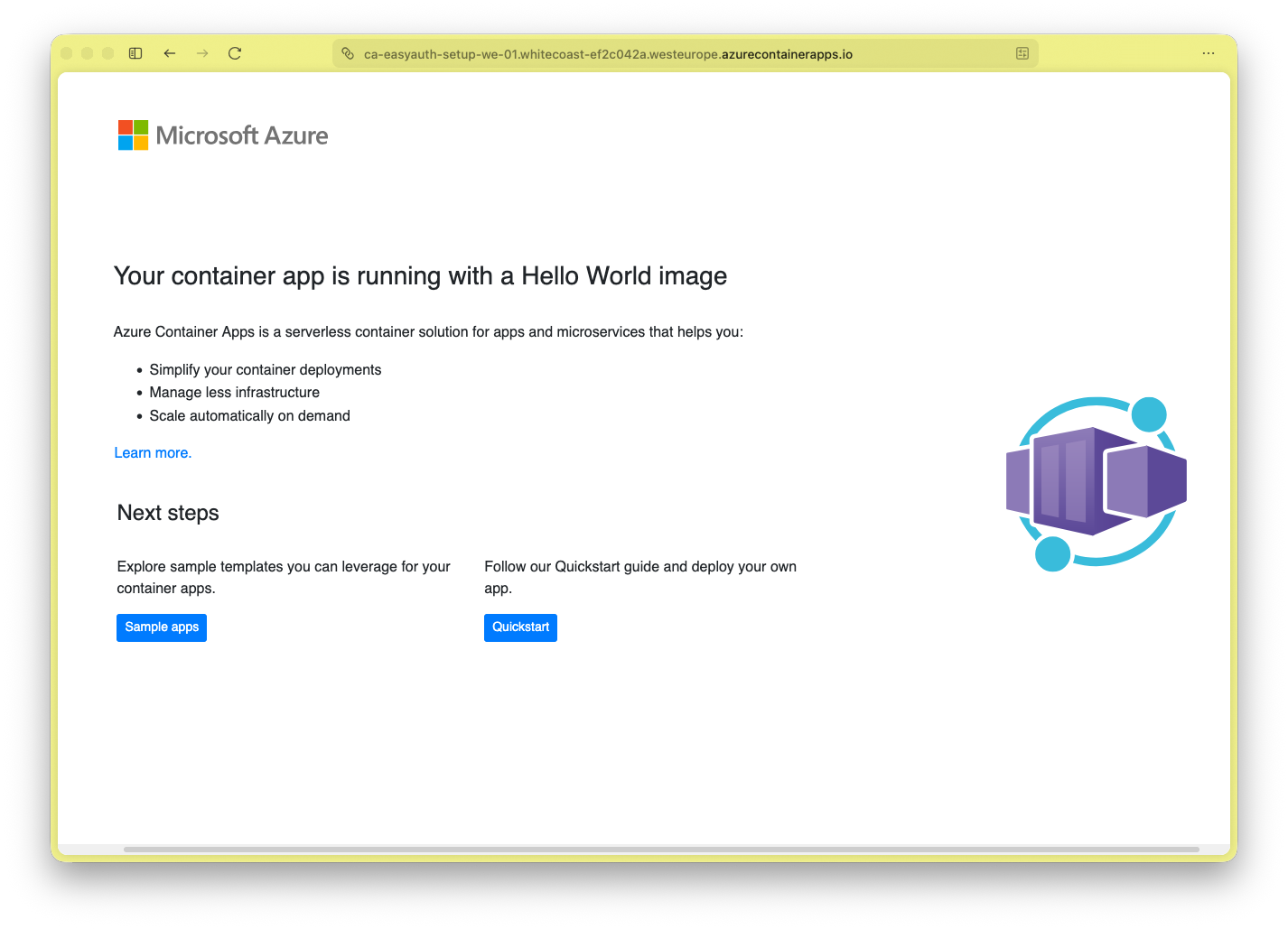
<p>Et voila - we got a site which we can access and the following url yields:</p>

<p><img src="/assets/images/2025-11-27-hello-world.png" alt="Web capture showing hello world container app" /></p>

<p>And this simple .NET Console App:</p>
<div class="language-csharp highlighter-rouge"><div class="highlight"><pre class="highlight"><code><span class="kt">var</span> <span class="n">httpClient</span> <span class="p">=</span> <span class="k">new</span> <span class="nf">HttpClient</span><span class="p">();</span>
<span class="kt">var</span> <span class="n">resp</span>  <span class="p">=</span> <span class="k">await</span> <span class="n">httpClient</span><span class="p">.</span><span class="nf">GetAsync</span><span class="p">(</span><span class="s">"https://ca-easyauth-setup-we-01.whitecoast-ef2c042a.westeurope.azurecontainerapps.io/"</span><span class="p">);</span>
<span class="n">Console</span><span class="p">.</span><span class="nf">WriteLine</span><span class="p">(</span><span class="n">resp</span><span class="p">.</span><span class="n">StatusCode</span><span class="p">);</span>
</code></pre></div></div>
<p>will output:</p>
<div class="language-bash highlighter-rouge"><div class="highlight"><pre class="highlight"><code><span class="nv">$ </span>dotnet run
OK
</code></pre></div></div>

<p>So far, we have a Container App - which everybody can access. Not good for a non-public API ;)</p>

<h1 id="create-an-app-registration-container-app">Create an App Registration (Container App)</h1>

<ol>
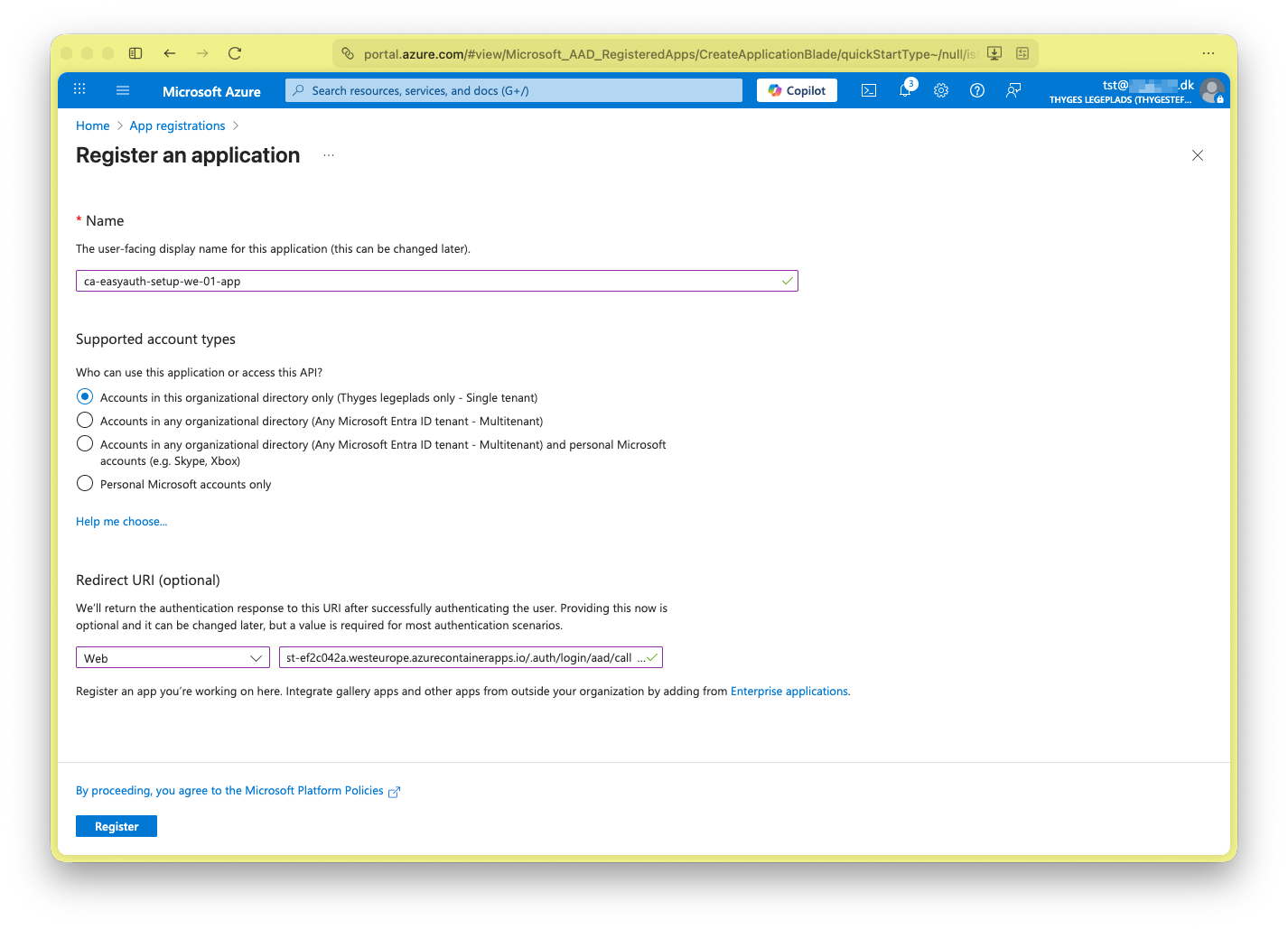
  <li>Let’s create a ‘App Registration’ representing the ‘Container App’.
<img src="/assets/images/2025-11-27-new-app-reg.png" alt="New app registration" /></li>
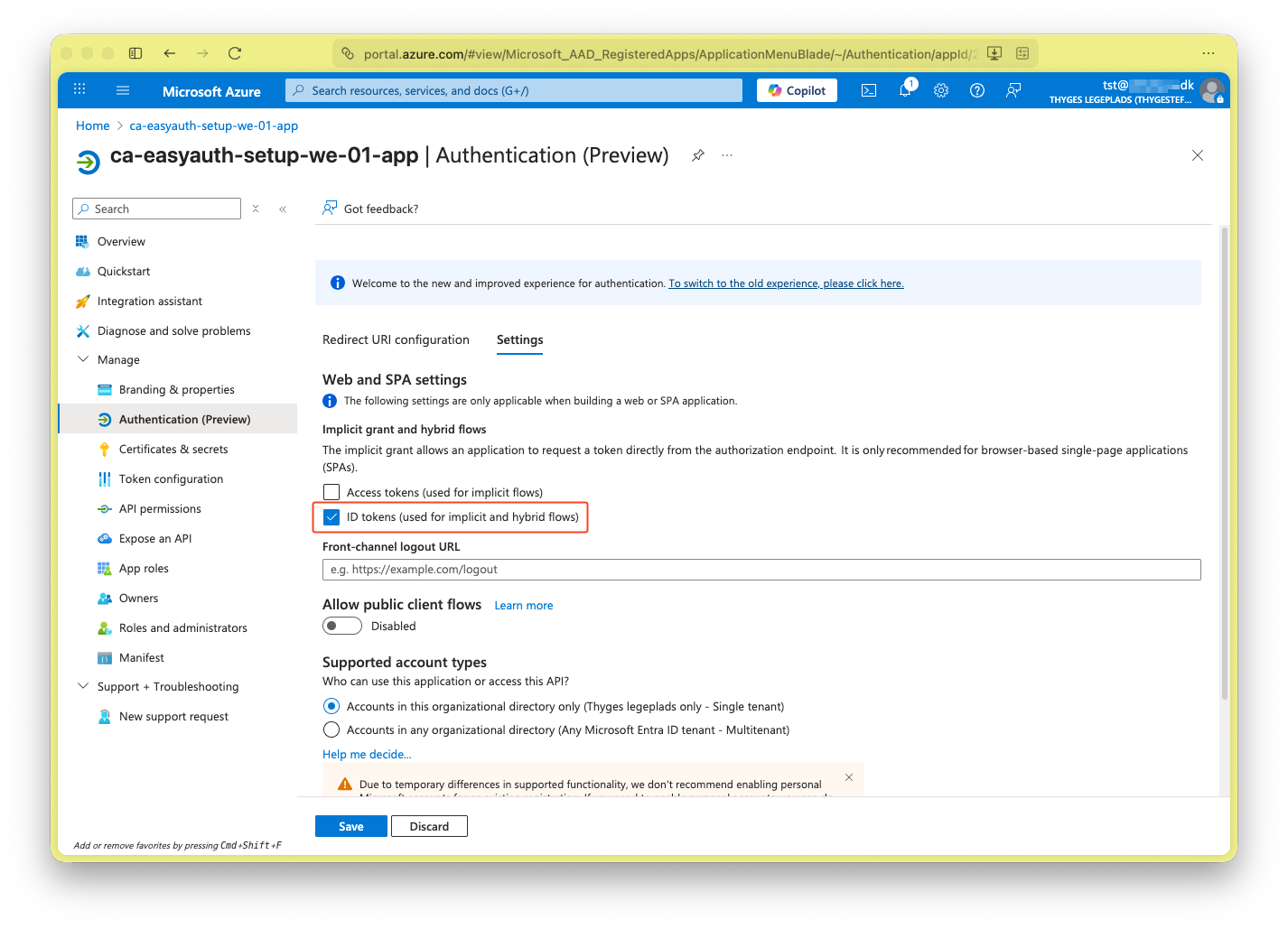
  <li>Go to ‘Manage &gt; Authentication (Preview)’ and under the ‘Settings’ tab, enable ‘ID tokens (used for implicit and hybrid flows)’.
   <img src="/assets/images/2025-11-27-authentication-settings.png" alt="Enable ID tokens" /></li>
  <li>Go to ‘Manage &gt; Expose an API’ and add ‘Application ID URI’</li>
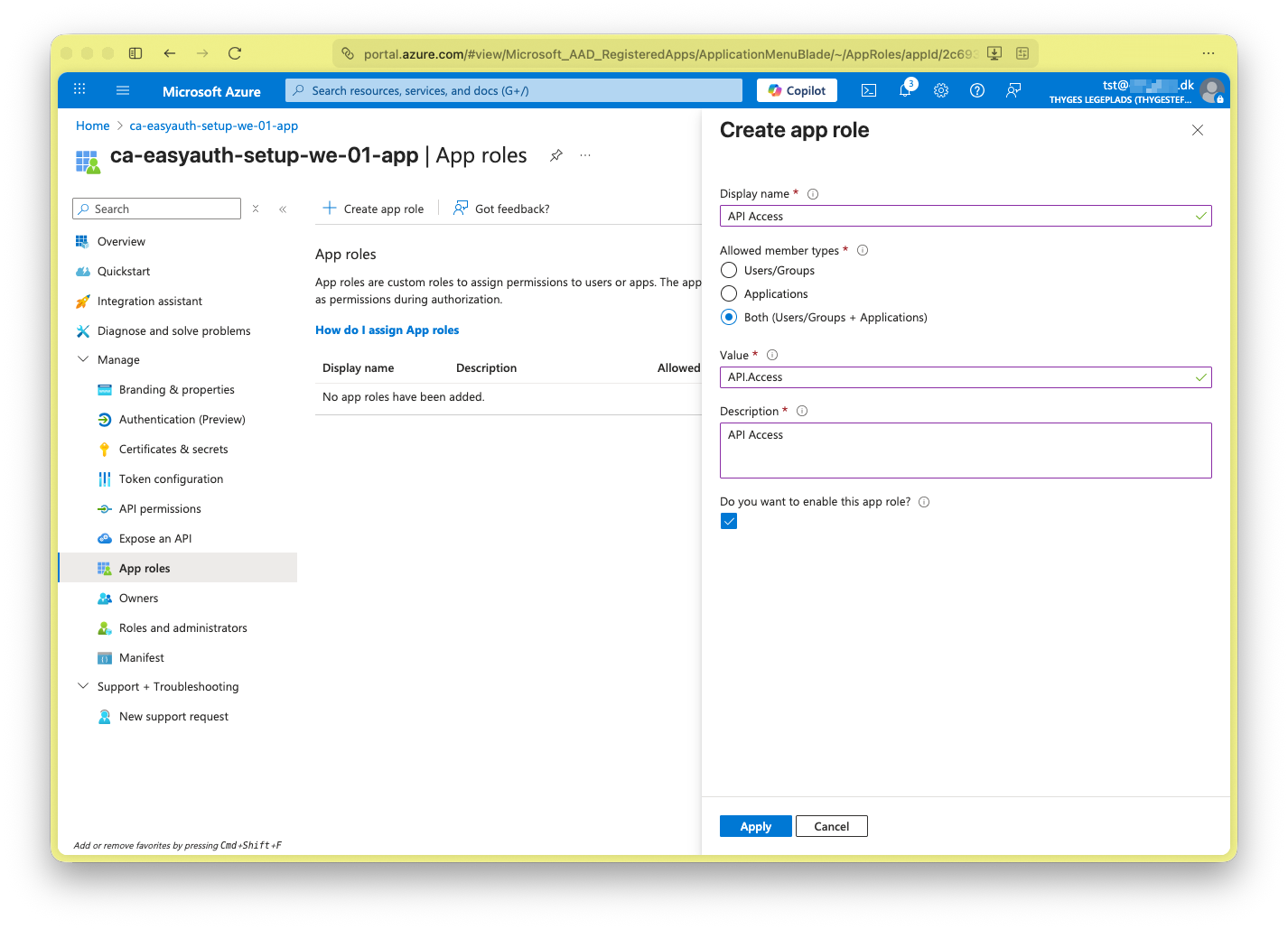
  <li>Go to ‘Manage &gt; App roles’ and add ‘Create app role’, give it a name and select ‘Both’.
<img src="/assets/images/2025-11-27-app-role.png" alt="App registration app role creation" /></li>
  <li>Go to ‘Manage &gt; API permissions’ and grant ‘Microsoft Graph (1) &gt; User.Read’
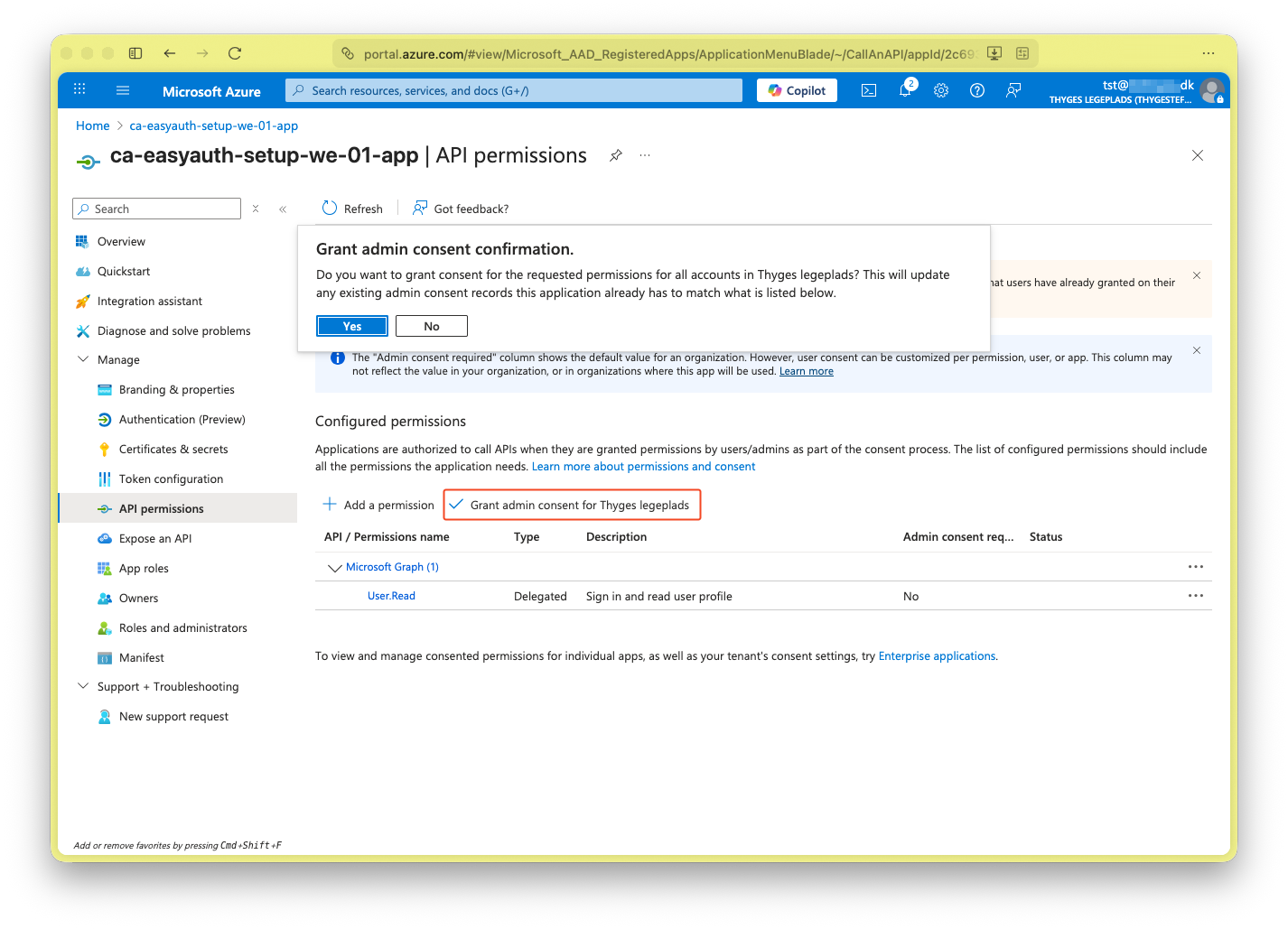
<img src="/assets/images/2025-11-27-grant-admin-consent.png" alt="Grant admin consent to Microsoft Graph User.Read permission" /></li>
  <li>Go to ‘Overview’ and access the underlaying ‘Managed application in local directory’.</li>
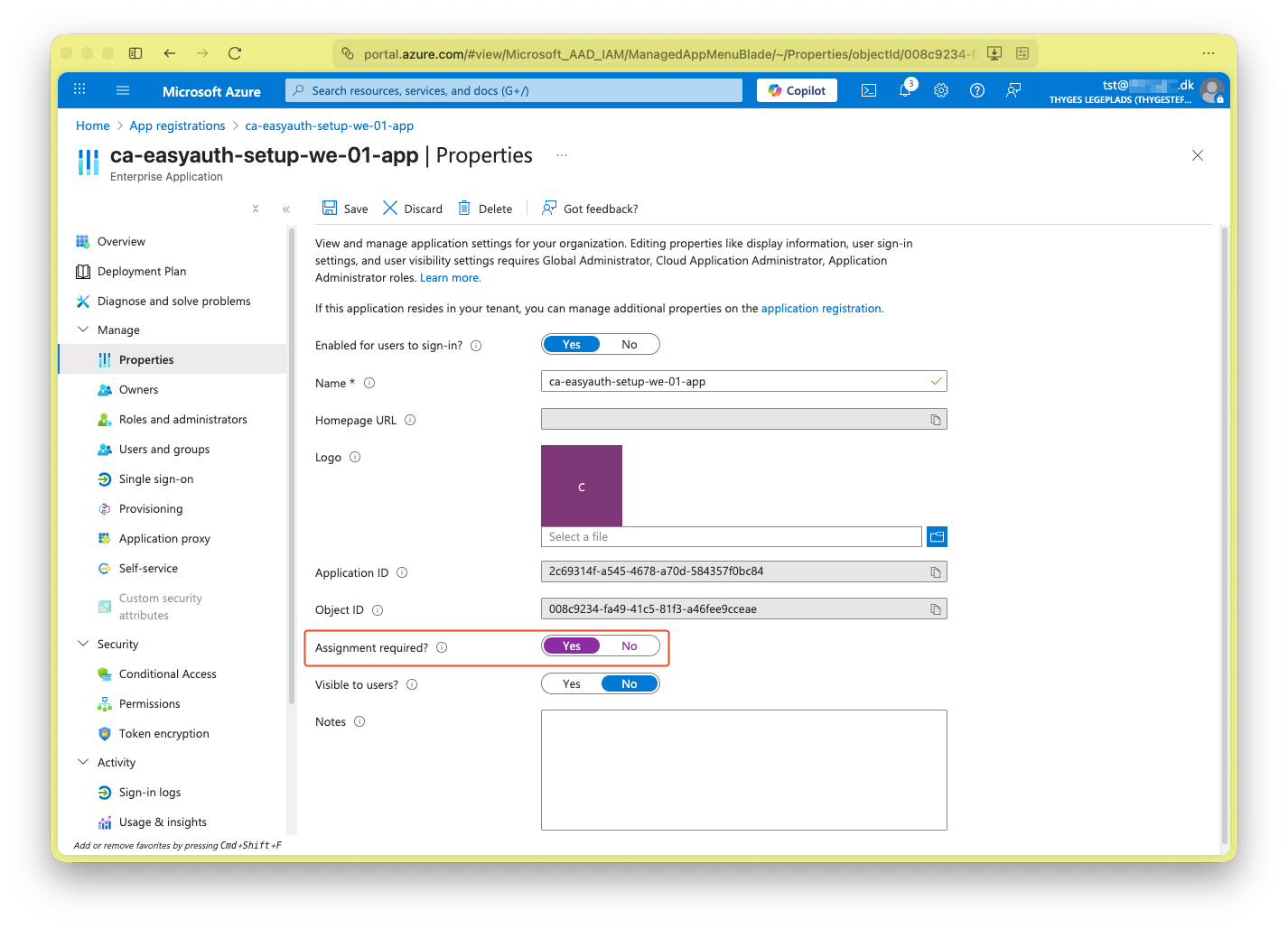
  <li>In the ‘Enterprise Application’ go to ‘Manage &gt; Properties’ and enable ‘Assignment required?’. This will block internal users access.
<img src="/assets/images/2025-11-27-enterprise-app-assignment-required.png" alt="Enable Assignment Required for Enterprise Application" /></li>
</ol>

<h1 id="configure-easy-auth">Configure Easy Auth</h1>

<ol>
  <li>Go back to the ‘Container App’.</li>
  <li>Go to ‘Security &gt; Authentication’.</li>
  <li>Add ‘Add identity provider’ and select ‘Microsoft’ as the ‘Identity provider’.
    <ol>
      <li>Select ‘Pick an existing app registration in this directory’ and select expiry.</li>
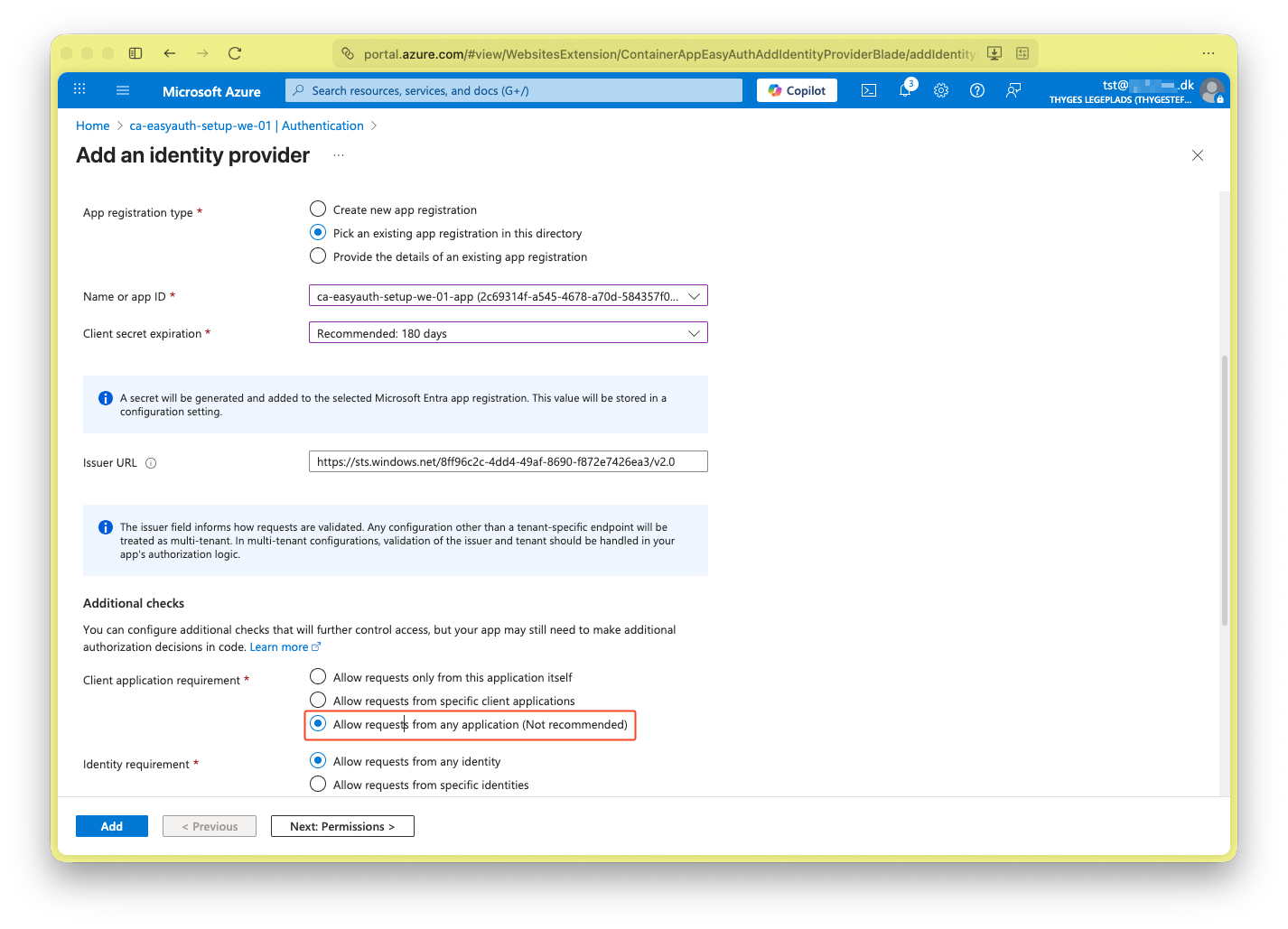
      <li>Enable ‘Allow requests from any application (Not recommended)’. This is okay, because we enabled ‘Assignment required?’ in the ‘Enterprise Application’.
<img src="/assets/images/2025-11-27-container-app-auth-set-up.png" alt="Container App Authentication set-up" /></li>
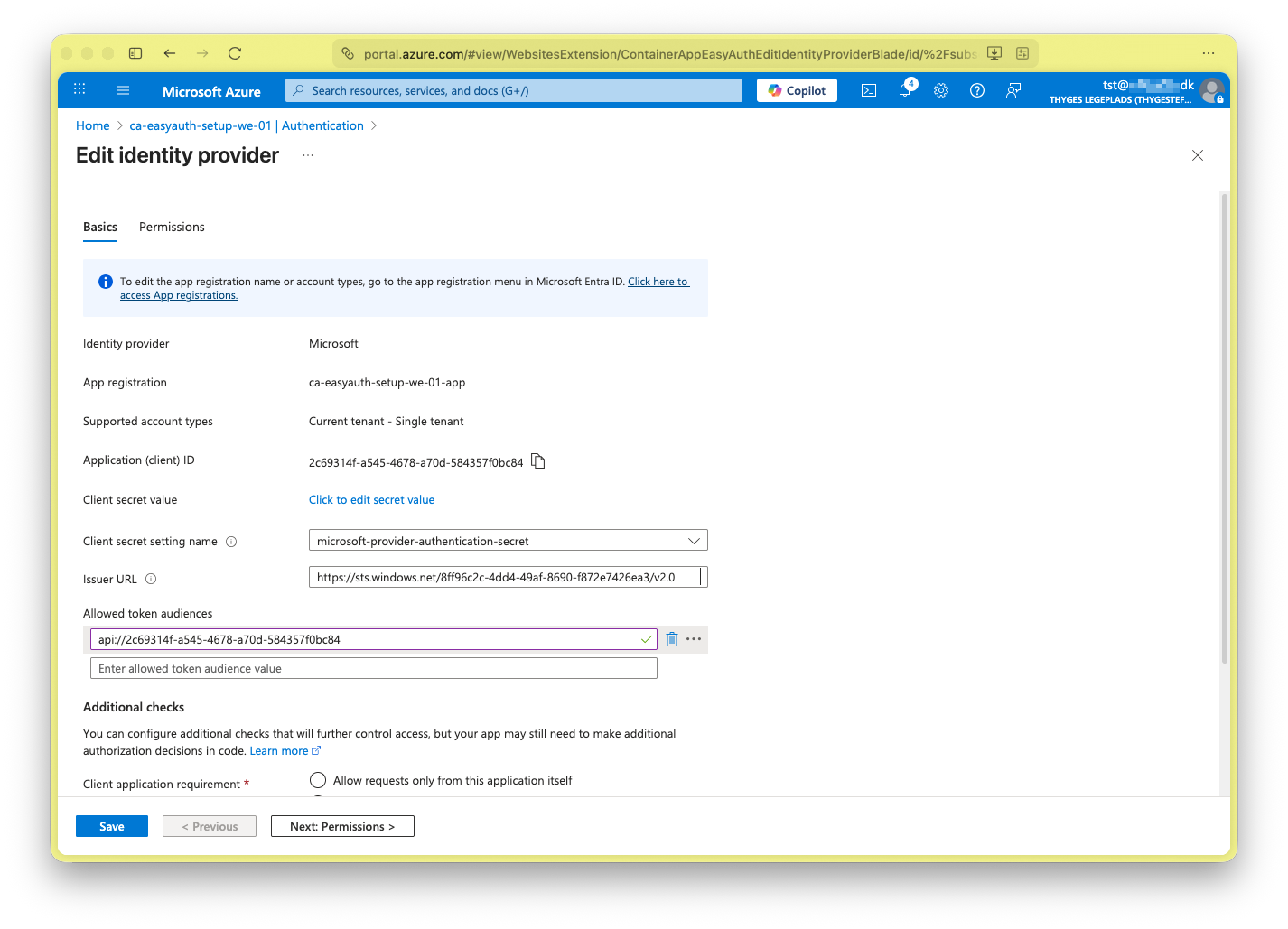
      <li>Save and edit to set audience which is the ‘Application ID’ under ‘Mange &gt; Expose an API’ from above (Yes… according the documentation this should be a default, but it need to be explicit…).
<img src="/assets/images/2025-11-27-container-app-authentication.png" alt="Container App Authentication" /></li>
      <li>Press ‘Add’ and wait - now neither a User or Application can access the Container App.</li>
    </ol>
  </li>
</ol>

<p>Now we get this output from running the previous console app:</p>
<div class="language-bash highlighter-rouge"><div class="highlight"><pre class="highlight"><code><span class="nv">$ </span>dotnet run
Unauthorized
</code></pre></div></div>
<p>That’s good - we also get a log-in screen when accessing the web-page.</p>

<h1 id="give-access-to-users">Give access to Users</h1>

<ol>
  <li>Go to the ‘Container App’s ‘Enterpise Application and add a user or group under ‘Manage &gt; Users and groups’.</li>
</ol>

<h1 id="give-access-to-applications">Give access to Applications</h1>

<ol>
  <li>Create a new ‘App Registration’ representing the daemon application.</li>
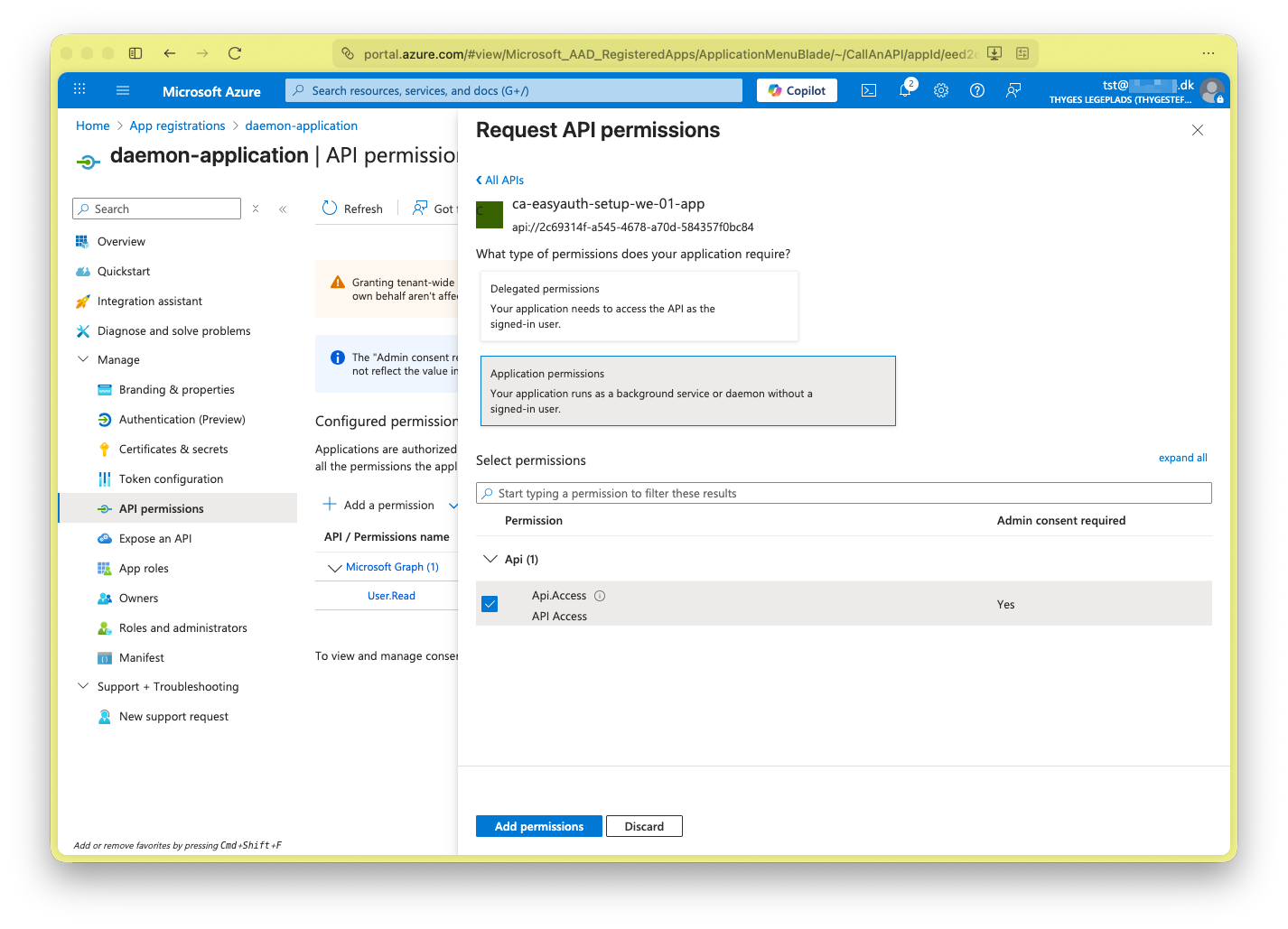
  <li>Go to ‘Mange &gt; API Permissions’ and press ‘Add a permission’ and assign the Container App App registrion role (It’s hidden under ‘APIs my organization uses’).
Select ‘Application permissions’ and select ‘Api.Access’
<img src="/assets/images/2025-11-27-app-role-assignment.png" alt="Daemon application app role assignment" /></li>
  <li>Grant permission.</li>
  <li>Get details to get a token using the App Registration.</li>
</ol>

<p>Now using the below simple console app:</p>
<div class="language-csharp highlighter-rouge"><div class="highlight"><pre class="highlight"><code><span class="c1">// From 'Azure.Identity' NuGet package</span>
<span class="kt">var</span> <span class="n">provider</span> <span class="p">=</span> <span class="k">new</span> <span class="nf">ClientSecretCredential</span><span class="p">(</span>
    <span class="n">tenantId</span><span class="p">:</span> <span class="s">"8ff96c2c-****-****-****-************"</span><span class="p">,</span>
    <span class="n">clientId</span><span class="p">:</span> <span class="s">"eed2eb09-5d39-4ff6-a214-f6ff72be5d87"</span><span class="p">,</span>
    <span class="n">clientSecret</span><span class="p">:</span> <span class="s">"****************************************"</span><span class="p">);</span>

<span class="kt">var</span> <span class="n">token</span> <span class="p">=</span> <span class="n">provider</span><span class="p">.</span><span class="nf">GetToken</span><span class="p">(</span><span class="k">new</span> <span class="nf">TokenRequestContext</span><span class="p">([</span><span class="s">"api://2c69314f-a545-4678-a70d-584357f0bc84/.default"</span><span class="p">])).</span><span class="n">Token</span><span class="p">;</span>

<span class="kt">var</span> <span class="n">httpClient</span> <span class="p">=</span> <span class="k">new</span> <span class="nf">HttpClient</span><span class="p">();</span>
<span class="n">httpClient</span><span class="p">.</span><span class="n">DefaultRequestHeaders</span><span class="p">.</span><span class="n">Authorization</span> <span class="p">=</span>
    <span class="k">new</span> <span class="nf">AuthenticationHeaderValue</span><span class="p">(</span><span class="s">"Bearer"</span><span class="p">,</span> <span class="n">token</span><span class="p">);</span>

<span class="kt">var</span> <span class="n">resp</span>  <span class="p">=</span> <span class="k">await</span> <span class="n">httpClient</span><span class="p">.</span><span class="nf">GetAsync</span><span class="p">(</span><span class="s">"https://ca-easyauth-setup-we-01.whitecoast-ef2c042a.westeurope.azurecontainerapps.io/"</span><span class="p">);</span>
<span class="n">Console</span><span class="p">.</span><span class="nf">WriteLine</span><span class="p">(</span><span class="n">resp</span><span class="p">.</span><span class="n">StatusCode</span><span class="p">);</span>
</code></pre></div></div>

<p>will yeild:</p>
<div class="language-bash highlighter-rouge"><div class="highlight"><pre class="highlight"><code><span class="nv">$ </span>dotnet run
OK
</code></pre></div></div>

<h1 id="recap">Recap</h1>

<p>Now, we have enabled authentication for our Container App, and explicit grant access to users or applicaitons.</p>

<h1 id="gotcha">Gotcha</h1>

<ul>
  <li>Not enabling ‘Assignment required?’ will make all users in the tenant able to access the app.</li>
  <li>Enabling ‘Allow requests from any application (Not recommended)’ will make any application in the tenant access the Container App, if ‘Assignment required?’ is not enabled.</li>
  <li>Some would argue that this is “more” fragile than a coded approach. Because, this can be “disabled” by ill-configuring the ‘Container App’ or the ‘Enterprise Application’ whereas the coded approach most likely will go through a pull request.</li>
</ul>]]></content><author><name>Thyge S. Steffensen</name></author><summary type="html"><![CDATA[I had some trouble figuring out how to enable EasyAuth and controlling which users/applications that could access the “EasyAuth’ed” “app”.]]></summary></entry><entry><title type="html">Rewriting Azure DevOps pipeline to GitHub Actions workflow</title><link href="https://blog.thygesteffensen.dk//2025/03/09/rewriting-ado-pipeline-to-github-action-workflow.html" rel="alternate" type="text/html" title="Rewriting Azure DevOps pipeline to GitHub Actions workflow" /><published>2025-03-09T00:00:00+00:00</published><updated>2025-03-09T00:00:00+00:00</updated><id>https://blog.thygesteffensen.dk//2025/03/09/rewriting-ado-pipeline-to-github-action-workflow</id><content type="html" xml:base="https://blog.thygesteffensen.dk//2025/03/09/rewriting-ado-pipeline-to-github-action-workflow.html"><![CDATA[<!-- #Rewriting Azure DevOps pipeline to GitHub Actions workflow -->

<p>As a consultant within the Microsoft stack, most of the code is hosted in Azure DevOps repositories and we’ll use Azure DevOps Pipelines as the CI/CD pipeline.</p>

<p>Well, what if it should be hosted in GitHub instead, and use GitHub Actions? I’ve use GitHub Actions for my own stuff and during my studies, so how hard can it be to convert a Azure DevOps pipeline to a GitHub Actions workflow?</p>

<p>I’ll go through the Azure DevOps pipelines, or just pipelines, for <a href="https://xrm.dev">XrmBedrock</a> and convert them to GitHub Action workflows, or just workflows.</p>

<h2 id="github-actions-azure-devops-pipelines">GitHub Actions? Azure DevOps Pipelines?</h2>

<p>They are basically the same, and now both developed by Microsoft. They are a workflow/pipeline language and runtime, where “developers” can write defintion which will be executed in the runners. This is a way to basically execute shell commands, to build, test and deploy software - and possible way more!</p>

<p>Both are writing using <code class="language-plaintext highlighter-rouge">yaml</code> (Yet another markup language) and are quite similiar and almost identical feature set, for our scope at least. This is also comparable to GitLab CI/CD.</p>

<h2 id="the-pipelines">The Pipelines</h2>

<p><a href="https://xrm.dev">XrmBedrock</a> is the replacement for <a href="https://github.com/delegateas/XrmFramework">XrmFramework</a>, both of which are a framework/opinoted steup to work with plugins and web-resources with Power Apps. XrmBedrock is extended with support for working with Azure Functions in regards to Power Apps.</p>

<p>As many other projects, we have two pipelines: (1) Build and Test and (2) Deploy. The Power Apps stuff are intermingled with Azure stuff, to streamline deployment - I’m going to focus on the Power Apps part today.</p>

<h2 id="build-and-test">Build and Test</h2>

<p>The <code class="language-plaintext highlighter-rouge">Build.yaml</code> pipeline is a great starting point, it uses <code class="language-plaintext highlighter-rouge">templates</code> which is a way to “generalize” pipeline definitions and make them reuseable. GitHub has the same, called <a href="https://docs.github.com/en/actions/writing-workflows/using-workflow-templates">workflow template</a> and is a bit different. But there is also <a href="https://docs.github.com/en/actions/sharing-automations/avoiding-duplication">two other alternatives</a> with two alternatives: (1) Reuseable workflows and (2) Composite actions.</p>

<p>Workflow template cannot be in the same repository and they are a bit more tricky for our use case. They are better suited to create org-wide “reusable” actions - which is not what we are looking for. Let’s focus on the two other alternatives.</p>

<p>Composite actions are like <code class="language-plaintext highlighter-rouge">microsoft/action-python</code>, and the steps within the action is not logged, making it difficult to narrow down a potentiel error since the ‘Build and Test’ workflow both generates contexts, builds and runs tests (and maybe more). However, Reusable workflows is a bit more similiar to how templating works in Azure DevOps.</p>

<p>However, there is a major difference. In Azure DevOps, templates are injected and “expanded” when running the pipeline, which gives the flexibility to “template” the first n-steps and the add other steps in the same job. But in GitHub, a re-useable workflow is an entire job and this does not give the “freedom” to extend a job with additional steps. Remember, each job is executed in a new container and does not have the state of the previous job’s steps.</p>

<p>Let’s first create the <code class="language-plaintext highlighter-rouge">BuildSteps.yaml</code>. In GitHub, re-useable workflows have a trigger and here we can define inputs, just as <code class="language-plaintext highlighter-rouge">parameters</code> in Azure DevOps.</p>

<div class="language-yaml highlighter-rouge"><div class="highlight"><pre class="highlight"><code><span class="na">name</span><span class="pi">:</span> <span class="s">Build and Test steps</span>

<span class="na">on</span><span class="pi">:</span>
  <span class="na">workflow_call</span><span class="pi">:</span>
    <span class="na">secrets</span><span class="pi">:</span>
      <span class="na">CLIENT_SECRET</span><span class="pi">:</span>
        <span class="na">required</span><span class="pi">:</span> <span class="no">true</span>
</code></pre></div></div>

<p>The <code class="language-plaintext highlighter-rouge">jobs</code> part is similiar, and here we define which runner we will use. GitHub does not automatically checkout the repository as in Azure DevOps.</p>

<div class="language-yaml highlighter-rouge"><div class="highlight"><pre class="highlight"><code><span class="nn">...</span>
<span class="na">jobs</span><span class="pi">:</span>
  <span class="na">buildandtest</span><span class="pi">:</span>
    <span class="na">runs-on</span><span class="pi">:</span> <span class="s">windows-latest</span>
    <span class="na">steps</span><span class="pi">:</span>
      <span class="pi">-</span> <span class="na">name</span><span class="pi">:</span> <span class="s">Checkout repository</span>
        <span class="na">uses</span><span class="pi">:</span> <span class="s">actions/checkout@v4</span>

      <span class="pi">-</span> <span class="na">name</span><span class="pi">:</span> <span class="s">Setup .NET </span><span class="m">8</span>
        <span class="na">uses</span><span class="pi">:</span> <span class="s">actions/setup-dotnet@v3</span>
        <span class="na">with</span><span class="pi">:</span>
          <span class="na">dotnet-version</span><span class="pi">:</span> <span class="s">8.x</span>

      <span class="pi">-</span> <span class="na">name</span><span class="pi">:</span> <span class="s">Restore dependencies</span>
        <span class="na">run</span><span class="pi">:</span> <span class="s">dotnet restore</span>
<span class="nn">...</span>
</code></pre></div></div>

<p>So far so good, now we need to execute some of the F# scripts. These are targetted .NET Framework and we cannot use <code class="language-plaintext highlighter-rouge">dotnet fsi</code>. We must use the <code class="language-plaintext highlighter-rouge">fsi.exe</code> bundled with Visual Studio. To our luck, Visual Studio comes pre-installed on the <a href="https://github.com/actions/runner-images/blob/main/images/windows/Windows2022-Readme.md#visual-studio-enterprise-2022">windows runner</a>.</p>

<p>To make the workflow more readiable, we can save reused paths and more in the job environment:</p>

<div class="language-yaml highlighter-rouge"><div class="highlight"><pre class="highlight"><code><span class="nn">...</span>
  <span class="na">buildandtest</span><span class="pi">:</span>
    <span class="na">runs-on</span><span class="pi">:</span> <span class="s">windows-latest</span>
    <span class="na">env</span><span class="pi">:</span>
        <span class="na">FSI_PATH</span><span class="pi">:</span> <span class="s1">'</span><span class="s">C:\Program</span><span class="nv"> </span><span class="s">Files\Microsoft</span><span class="nv"> </span><span class="s">Visual</span><span class="nv"> </span><span class="s">Studio\2022\Enterprise\Common7\IDE\CommonExtensions\Microsoft\FSharp\Tools\fsi.exe'</span>
        <span class="na">DAXIF_PATH</span><span class="pi">:</span> <span class="s1">'</span><span class="s">Dataverse/Tools/Daxif'</span>

    <span class="err">  </span><span class="pi">-</span> <span class="na">name</span><span class="pi">:</span> <span class="s">Update C# Context</span>
        <span class="na">run</span><span class="pi">:</span> <span class="s1">'</span><span class="s">&amp;</span><span class="nv"> </span><span class="s">"$env:FSI_PATH"</span><span class="nv"> </span><span class="s">$env:DAXIF_PATH/GenerateDataverseDomain.fsx</span><span class="nv"> </span><span class="s">/mfaAppId="$"</span><span class="nv"> </span><span class="s">/mfaClientSecret="$"</span><span class="nv"> </span><span class="s">/method="ClientSecret"'</span>
<span class="nn">...</span>
</code></pre></div></div>

<p>Now we have our re-useable workflow, stored in <code class="language-plaintext highlighter-rouge">.github/workflows/build-and-test.yaml</code>, on it can be seen just below or in the <a href="">pull request</a>.</p>

<details>
<summary>`build-and-test.yaml`</summary>
<pre>
```
name: (child) Build and Test job

on:
  workflow_call:
    inputs:
      SYNC:
        required: false
        type: boolean
    secrets:
      CLIENT_SECRET:
        required: true

jobs:
  buildandtest:
    runs-on: windows-latest
    environment: dev
    env:
        FSI_PATH: 'C:\Program Files\Microsoft Visual Studio\2022\Enterprise\Common7\IDE\CommonExtensions\Microsoft\FSharp\Tools\fsi.exe'
        DAXIF_PATH: 'src/Tools/Daxif'
    steps:
      - name: Checkout repository
        uses: actions/checkout@v4

      - name: Setup .NET 8
        uses: actions/setup-dotnet@v3
        with:
          dotnet-version: 8.x

      - name: Add signtool.exe to path for build
        run: |
          $signtool = Get-ChildItem "C:\Program Files (x86)\Windows Kits\10\bin\" `
                        -Recurse -Filter signtool.exe `
                        | Where-Object { $_.FullName -match '\\x64\\' } `
                        | Sort-Object LastWriteTime -Descending `
                        | Select-Object -First 1 -ExpandProperty DirectoryName
          if (-not $signtool) {
            throw "signtool.exe (x64) was not found!"
          }
          echo "PATH=$signtool;$" | Out-File -FilePath $env:GITHUB_ENV -Encoding utf8 -Append
          echo "Located signtool at: $PATH"

      - name: Setup Node 18
        uses: actions/setup-node@v4
        with:
          node-version: 18

      - name: Restore dependencies
        run: dotnet restore

      - name: Update C# Context
        run: '&amp; "$env:FSI_PATH" $env:DAXIF_PATH/GenerateDataverseDomain.fsx /mfaAppId="$" /mfaClientSecret="$" /method="ClientSecret"'

      - name: Update TS Context
        run: '&amp; "$env:FSI_PATH" $env:DAXIF_PATH/GenerateTypeScriptContext.fsx /mfaAppId="$" /mfaClientSecret="$" /method="ClientSecret"'
        
      - name: Update test metadata
        run: '&amp; "$env:FSI_PATH" $env:DAXIF_PATH/GenerateTestMetadata.fsx /mfaAppId="$" /mfaClientSecret="$" /method="ClientSecret"'

      - name: Build solution
        run: 'dotnet build --no-restore --configuration release'

      - name: Run tests
        run: 'dotnet test --no-build --configuration release'
        
      - name: Sync plugins
        if: $ 
        run: '&amp; "$env:FSI_PATH" $env:DAXIF_PATH/PluginSyncDev.fsx /mfaAppId="$" /mfaClientSecret="$" /method="ClientSecret"'

      - name: Sync web resources 
        if: $ 
        run: '&amp; "$env:FSI_PATH" $env:DAXIF_PATH/WebResourceSyncDev.fsx /mfaAppId="$" /mfaClientSecret="$" /method="ClientSecret"'
        
      - name: Publish DAXIF artifact
        if: $ 
        uses: actions/upload-artifact@v4
        with:
          name: daxif
          path: $

```
</pre>
</details>

<p>The <code class="language-plaintext highlighter-rouge">Build.yaml</code> Azure DevOps pipeline uses <code class="language-plaintext highlighter-rouge">trigger: none</code> and <code class="language-plaintext highlighter-rouge">pr: master</code>, which means it only runs on pull requests. We can do the same in GitHub.</p>

<blockquote>
  <p>NOTE:<br />
<code class="language-plaintext highlighter-rouge">workflow_dispatch:</code> is used to trigger a workflow from the UI!</p>
</blockquote>

<div class="language-yaml highlighter-rouge"><div class="highlight"><pre class="highlight"><code><span class="na">name</span><span class="pi">:</span> <span class="s">Build and Test</span>

<span class="na">on</span><span class="pi">:</span>
  <span class="na">pull_request</span><span class="pi">:</span>
    <span class="na">types</span><span class="pi">:</span>
      <span class="pi">-</span> <span class="s">opened</span>
      <span class="pi">-</span> <span class="s">synchronize</span>
    <span class="na">branches</span><span class="pi">:</span>
      <span class="pi">-</span> <span class="s">main</span>

<span class="na">jobs</span><span class="pi">:</span>
  <span class="na">buildandtest</span><span class="pi">:</span>
    <span class="na">uses</span><span class="pi">:</span> <span class="s">./.github/workflows/build-and-test.yaml</span>
    <span class="na">environment</span><span class="pi">:</span> <span class="s">dev</span>
    <span class="na">secrets</span><span class="pi">:</span>
      <span class="na">CLIENT_SECRET</span><span class="pi">:</span> <span class="s">$</span>
</code></pre></div></div>

<p>I have create an ‘Environment’, <code class="language-plaintext highlighter-rouge">dev</code>, with the <code class="language-plaintext highlighter-rouge">CLIENT_SECRET</code> as a secret and <code class="language-plaintext highlighter-rouge">DATAVERSE_APP_ID</code> as a variable. A similiar envionment can be created for the test environment. These can also be set up as a ‘guard’.</p>

<h2 id="deploy">Deploy</h2>

<p>Let’s continue with the deploy pipeline, with focus on Power Platform. The Azure DevOps pipeline is constructed with a lot of templates, where many only are used once. I find it easier to read pipelines when they don’t have too many levels of templating.</p>

<p>So, the GitHub Actions version will be a bit different and we can always refactor it to reuseable workflows when the workflows are too big and the need arises.</p>

<p>To deploy we must first perform some actions to create the “deployment package”, which is deployed upstream.</p>

<p>We must: (1) build plugins and webresources, (2) sync them to the Power Platform environment, (3) Publish the changes and (4) export the solution, which is a “dployment package”.</p>

<p>The pipeline uses “artifacts” to share the “dployment pacakge” with later stages, and GitHub Actions has the same concept, <em>artifacts</em>.</p>

<p>Jobs in GitHub Actions don’t share ‘context’. I.e., build created in a job is not avaible in a following job, just like in jobs and stages in Azure DevOps. So, our <code class="language-plaintext highlighter-rouge">build-and-test.yaml</code> already builds and tests as we need, but the work is gone when the job ends.</p>

<p>This is not a problem in Azure Devops, due to how it handles templating. To work around this, we extend <code class="language-plaintext highlighter-rouge">build-and-test.yaml</code> with the steps dependant or the build “work” using <code class="language-plaintext highlighter-rouge">if</code> and a new input <code class="language-plaintext highlighter-rouge">SYNC</code>:</p>

<div class="language-yaml highlighter-rouge"><div class="highlight"><pre class="highlight"><code><span class="nn">...</span>
      <span class="pi">-</span> <span class="na">name</span><span class="pi">:</span> <span class="s">Sync plugins</span>
        <span class="na">if</span><span class="pi">:</span> <span class="s">$</span> 
        <span class="na">run</span><span class="pi">:</span> <span class="s1">'</span><span class="s">&amp;</span><span class="nv"> </span><span class="s">"$env:FSI_PATH"</span><span class="nv"> </span><span class="s">$env:DAXIF_PATH/PluginSyncDev.fsx</span><span class="nv"> </span><span class="s">/mfaAppId="$"</span><span class="nv"> </span><span class="s">/mfaClientSecret="$"</span><span class="nv"> </span><span class="s">/method="ClientSecret"'</span>

      <span class="pi">-</span> <span class="na">name</span><span class="pi">:</span> <span class="s">Sync web resources</span> 
        <span class="na">if</span><span class="pi">:</span> <span class="s">$</span> 
        <span class="na">run</span><span class="pi">:</span> <span class="s1">'</span><span class="s">&amp;</span><span class="nv"> </span><span class="s">"$env:FSI_PATH"</span><span class="nv"> </span><span class="s">$env:DAXIF_PATH/WebResourceSyncDev.fsx</span><span class="nv"> </span><span class="s">/mfaAppId="$"</span><span class="nv"> </span><span class="s">/mfaClientSecret="$"</span><span class="nv"> </span><span class="s">/method="ClientSecret"'</span>
</code></pre></div></div>
<p><em>The ‘auth’ parts is not a “variable”, when running <code class="language-plaintext highlighter-rouge">&amp; "$env:FSI_PATH" $env:DAXIF_PATH/WebResourceSyncDev.fsx $env:AUTH_PARAMS</code> the parameters was not expanded properly and thus not parsed correctly into the script.</em></p>

<p>This way, we can divide our work into three+ jobs: (1) Build, test and sync, (2) Publish and create package and (3) deploy to the different environments. And, we can use <code class="language-plaintext highlighter-rouge">build-and-test.yaml</code> when validating pull requests, wihtout syncing.</p>

<p>Only part (1) needs to codebase, so we can speed it up by avoiding to checkout the repository in part (2) and (3). However, part (2) and (3) needs Daxif and the scripts, so we upload them as an artifact in <code class="language-plaintext highlighter-rouge">build-and-test.yaml</code>.</p>

<p>To finish the sync of plugins and web-resources and finish the deploy, we must Publish the changes in Power Platform. The Azure DevOps pipelines uses the <code class="language-plaintext highlighter-rouge">PowerPlatformToolInstaller</code> task to setup “Power Platform Build Tools”, in GitHub actions we can use the <code class="language-plaintext highlighter-rouge">microsoft/powerplatform-actions/actions-install@v1</code> action. However, the “Power Platform Build Tools” is just a <a href="https://github.com/micrsoft/powerplatform-build-tools">wrapper</a> for <code class="language-plaintext highlighter-rouge">pac</code> (Power Platform CLI), which can be installed as a dotnet tool with <code class="language-plaintext highlighter-rouge">dotnet tool install Microsoft.PowerApps.CLI.Tool</code>.</p>

<p>I prefer avoid the wrapper and using the CLI tools plain. I’m more likely to be familiar with the CLI tools compared to the <em>tasks</em> and I find it easier to read and understand pipeline. In addition, it is easier to “execute” the pipeline locally step-by-step and try it out - which also makes it easier to write pipelines.</p>

<blockquote>
  <p>NOTE:
Using tasks such as <code class="language-plaintext highlighter-rouge">actions/setup-dotnet@v3</code> or <code class="language-plaintext highlighter-rouge">actions/checkout@4</code> makes good sense, since they interact with the runner in a different way. E.g., setting environment variablesm, installing dependencies or performing I/O actions.</p>
</blockquote>

<h2 id="conclusion">Conclusion</h2>

<p>We have converted the Power Apps part of the XrmBedrock Azure DevOps pipelines to GitHub Actions. The entire code can be seen in this <a href="https://github.com/delegateas/XrmBedrock/pull/9">pull request</a> and it should not be dificult to extend these with support the Azure part also.</p>

<p>For this use case, GitHub Actions is feature comparible with Azure DevOps pipelines and are just as easy/deficult to work with.</p>

<h2 id="miscellanous">Miscellanous</h2>

<p>To make a quicker feedback loop, I ended up creating a few small workflows to test everything out and play around woth workflows.</p>

<h3 id="sample-fsiexe-test-workflow">Sample <code class="language-plaintext highlighter-rouge">fsi.exe</code> test workflow</h3>

<div class="language-yaml highlighter-rouge"><div class="highlight"><pre class="highlight"><code><span class="na">name</span><span class="pi">:</span> <span class="s">F# Interactive Test</span>

<span class="na">on</span><span class="pi">:</span>
  <span class="na">workflow_dispatch</span><span class="pi">:</span>

<span class="na">jobs</span><span class="pi">:</span>
  <span class="na">test-fsi</span><span class="pi">:</span>
    <span class="na">name</span><span class="pi">:</span> <span class="s">Test F# Interactive (fsi.exe)</span>
    <span class="na">runs-on</span><span class="pi">:</span> <span class="s">windows-latest</span>

    <span class="na">steps</span><span class="pi">:</span>
      <span class="pi">-</span> <span class="na">name</span><span class="pi">:</span> <span class="s">Locate FSI.exe</span>
        <span class="na">id</span><span class="pi">:</span> <span class="s">find-fsi</span>
        <span class="na">shell</span><span class="pi">:</span> <span class="s">pwsh</span>
        <span class="na">run</span><span class="pi">:</span> <span class="pi">|</span>
          <span class="s">$fsiPath = "C:\Program Files\Microsoft Visual Studio\2022\Enterprise\Common7\IDE\CommonExtensions\Microsoft\FSharp\Tools\fsi.exe"</span>
          <span class="s">if (Test-Path $fsiPath) {</span>
            <span class="s">echo "FSI.exe found at $fsiPath"</span>
            <span class="s">echo "FSI_PATH=$fsiPath" | Out-File -Append -Encoding utf8 $env:GITHUB_ENV</span>
          <span class="s">} else {</span>
            <span class="s">echo "FSI.exe not found!"</span>
            <span class="s">exit 1</span>
          <span class="s">}</span>

      <span class="pi">-</span> <span class="na">name</span><span class="pi">:</span> <span class="s">Create F# Test Script</span>
        <span class="na">run</span><span class="pi">:</span> <span class="s">echo 'printfn "Hello from FSI!"' &gt; test.fsx</span>

      <span class="pi">-</span> <span class="na">name</span><span class="pi">:</span> <span class="s">Run F# Script using FSI.exe</span>
        <span class="na">run</span><span class="pi">:</span> <span class="s1">'</span><span class="s">&amp;</span><span class="nv"> </span><span class="s">"$env:FSI_PATH"</span><span class="nv"> </span><span class="s">test.fsx'</span>
</code></pre></div></div>]]></content><author><name>Thyge S. Steffensen</name></author><summary type="html"><![CDATA[]]></summary></entry><entry><title type="html">OpenAPI 3.0 automated Custom Connector</title><link href="https://blog.thygesteffensen.dk//2025/02/20/OpenAPI-30-Automated-Custom-Connector.html" rel="alternate" type="text/html" title="OpenAPI 3.0 automated Custom Connector" /><published>2025-02-20T00:00:00+00:00</published><updated>2025-02-20T00:00:00+00:00</updated><id>https://blog.thygesteffensen.dk//2025/02/20/OpenAPI%2030%20Automated%20Custom%20Connector</id><content type="html" xml:base="https://blog.thygesteffensen.dk//2025/02/20/OpenAPI-30-Automated-Custom-Connector.html"><![CDATA[<h1 id="openapi-30-automated-custom-connector">OpenAPI 3.0 automated Custom Connector</h1>

<p>This was the first iteration of automating a Custom Connector. The WebAPI was initial build in .NET 8 and used <a href="https://github.com/domaindrivendev/Swashbuckle.AspNetCore">Swashbuckle</a> to generate and expose the OpenAPI document as OpenAPI 3.0.</p>

<p>While writing <a href="/2025/02/14/Automated-Power-Platform-Custom-Connector.html">Automated Power Platform Custom Connector</a> and constructing a demonstration, I discovered that OpenAPI support in .NET 9 supported outputting the OpenAPI document as Swagger 2.0, both run-time and build-time.</p>

<p>However, some might be “stuck” on .NET 8 until the next LTS, or they might only get a OpenAPI 3.0 document from a vendor, then this method will work!</p>

<h2 id="the-script">The script</h2>
<p><em>… which can easily be converted to any pipeline language</em>.</p>

<p>The automation uses the following tools:</p>
<ul>
  <li><code class="language-plaintext highlighter-rouge">pac</code> <a href="https://learn.microsoft.com/fr-fr/power-platform/developer/cli/introduction">Power Platform CLI</a>
To download and update Custom Connector, and publish a solution.</li>
  <li><code class="language-plaintext highlighter-rouge">jq</code> <a href="https://jqlang.org/">Command-line JSON processor</a>
Miscellaneous JSON modifications.</li>
  <li><code class="language-plaintext highlighter-rouge">swagger</code> <a href="https://goswagger.io/go-swagger/">go-swagger</a>
To expand <code class="language-plaintext highlighter-rouge">$ref</code>, which is not fully supported in Custom Connector.</li>
  <li><code class="language-plaintext highlighter-rouge">api-spec-converter</code> <a href="https://github.com/LucyBot-Inc/api-spec-converter">api-spec-converter</a>
Most import, to convert from OpenAPI 3.x to Swagger 2.0.</li>
</ul>

<p>Compared to the .NET 9 version, this uses two tools to modify and convert the OpenAPI document, while using the same method to populate the Operation ID, but <a href="#modified-operation-id">slightly modified</a>.</p>

<pre><code class="language-ps1">&lt;#
    Endpoints must have the following:
        - OperationdId: Required to identify the operation in the Custom Connector, this is the name used in Power Apps
        - Summary: Omitting generates a warning
        - Description: Omitting generates a warning
    Custom Connector does not support oneOf, anyOf or similiar - this is removed by expanding the schema, because
    input/output with inheritance genreates defintions with oneOf.

    The apiDefintion.json must have host, basePath and schemes set.
    Not including the apiPropeerites.json, resets the colour - what else is reset when omitting?

    Tools:
        - pac (Power Platform CLI: https://docs.microsoft.com/en-us/power-platform/developer/data-integrator/pac-get-started)
          To retrive and update Custom Connector and publish changes.
        - jq (jqlang: https://stedolan.github.io/jq/. `brew install jq` or `winget install -e --id stedolan.jq`)
          To manipulate json files, remove objects and merge files.
        - api-spec-converter (https://www.npmjs.com/package/api-spec-converter. `npm install -g api-spec-converter`)
          To convert between openapi and swagger.
        - swagger (go-swagger: https://goswagger.io/go-swagger/. `brew tap go-swagger/go-swagger &amp;&amp; brew install go-swagger` or `docker? wsl?`)
          To flatten the swagger file, i.e. "removing" $refs and the use of `oneOf`.
#&gt;

# You need to be logged in in `pac` before running this script - `pac auth create`
$connectorId = "&lt;some-guid&gt;" # The guid - Use `pac connector list` to get the guid
$environment = "https://&lt;org&gt;.crm4.dynamics.com" # Use `pac env list` to get the URL
#$openApi = "https://dev.azurewebsites.net/swagger/v2/swagger.json" # The open api url
$openApi = "https://localhost:5100/swagger/v2/swagger.json" # The open api url

New-Item -ItemType Directory -Path out

# Prepare base from existing connector to keep settings
pac env select --environment $environment
pac connector download --connector-id $connectorId --outputDirectory out

jq 'del(.paths, .info)' out/apiDefinition.json &gt; out/base.json

Remove-Item out/apiDefinition.json

# Get and create new apiDefinition
curl $openApi -o out/openapi-spec-1.json

jq 'del(.components.securitySchemes, .security)' out/openapi-spec-1.json &gt; out/openapi-spec.json

api-spec-converter --from=openapi_3 --to=swagger_2 --syntax=json out/openapi-spec.json &gt; out/apiDefinition0.json

# Too complex with PowerShell...
jq -s '.[0] + .[1]' out/base.json out/apiDefinition0.json &gt; out/apiDefinition1.json

swagger flatten out/apiDefinition1.json -o out/apiDefinition.json --with-expand --with-flatten remove-unused

jq 'walk(if type == "object" and has("allOf")
         then reduce .allOf[] as $item ({}; . * $item) | del(.allOf)
         else . end)' out/apiDefinition.json &gt; out/apiDefinition-merged.json

# Upload
pac connector update --environment $environment --connector-id $connectorId --api-definition-file out/apiDefinition-merged.json --api-properties-file out/apiProperties.json --icon-file out/icon.png

# For good measure
pac solution publish

Remove-Item out -Recurse -Force
</code></pre>

<h3 id="openapi-30-to-swagger-20">OpenAPI 3.0 to Swagger 2.0</h3>

<p>This is done with <code class="language-plaintext highlighter-rouge">api-spec-converter</code>. It did a good job, but it did not create a version compatible with Custom Connectors. The schemes/definitions for input and output was too complex, had to many layers and consisted of <code class="language-plaintext highlighter-rouge">anyOf</code>, <code class="language-plaintext highlighter-rouge">allOf</code> and <code class="language-plaintext highlighter-rouge">oneOf</code>. These are not supported in a Custom Connector and some of them could be removed by simplifying the endpoint in .NET. E.g., by not accepting complex, inherited, types as the body definition.</p>

<p>But even after that, the definitions in the OpenAPI document still consisted of multiple layers, i.e. <code class="language-plaintext highlighter-rouge">$ref</code> containing <code class="language-plaintext highlighter-rouge">$ref</code> and so on. This was solved by flattening the schema and removing all <code class="language-plaintext highlighter-rouge">$ref</code> and all definitions with <code class="language-plaintext highlighter-rouge">swagger flatten</code>.</p>

<p>Now, I discovered that when a body definition was a C# type that extended a base type, the definition in the OpenAPI document consisted of an <code class="language-plaintext highlighter-rouge">allOf</code> of the two types — where it should just be a union of the two. This was solved by merging all such instances with <code class="language-plaintext highlighter-rouge">jq</code>.</p>

<h1 id="conclusion">Conclusion</h1>

<p>That’s about it. This solution is not perfect, and probably still needs some work with undiscovered edge cases, but we had a fairly advanced API which it supports.</p>

<h1 id="modified-operation-id">Modified Operation ID</h1>

<p>This is the version that can be used with Swashbuckle.</p>
<div class="language-csharp highlighter-rouge"><div class="highlight"><pre class="highlight"><code><span class="n">services</span><span class="p">.</span><span class="nf">AddSwaggerGen</span><span class="p">(</span><span class="n">options</span> <span class="p">=&gt;</span> <span class="p">{</span> <span class="n">options</span><span class="p">.</span><span class="nf">CustomOperationIds</span><span class="p">(</span><span class="n">x</span> <span class="p">=&gt;</span> <span class="n">x</span><span class="p">.</span><span class="nf">ToFriendlyString</span><span class="p">());</span> <span class="p">});</span>
</code></pre></div></div>
<div class="language-csharp highlighter-rouge"><div class="highlight"><pre class="highlight"><code><span class="k">public</span> <span class="k">static</span> <span class="kt">string</span> <span class="nf">ToFriendlyString</span><span class="p">(</span><span class="k">this</span> <span class="n">Microsoft</span><span class="p">.</span><span class="n">AspNetCore</span><span class="p">.</span><span class="n">Mvc</span><span class="p">.</span><span class="n">ApiExplorer</span><span class="p">.</span><span class="n">ApiDescription</span> <span class="n">apiDescription</span><span class="p">)</span>
<span class="p">{</span>
    <span class="kt">var</span> <span class="n">version</span> <span class="p">=</span> <span class="n">apiDescription</span><span class="p">.</span><span class="n">GroupName</span><span class="p">!;</span>
    <span class="kt">var</span> <span class="n">path</span> <span class="p">=</span> <span class="n">apiDescription</span><span class="p">.</span><span class="n">RelativePath</span><span class="p">!;</span>
    <span class="kt">var</span> <span class="n">paths</span> <span class="p">=</span> <span class="n">apiDescription</span><span class="p">.</span><span class="n">ParameterDescriptions</span><span class="p">.</span><span class="nf">Where</span><span class="p">(</span><span class="n">x</span> <span class="p">=&gt;</span> <span class="n">x</span><span class="p">.</span><span class="n">Source</span> <span class="p">==</span> <span class="n">BindingSource</span><span class="p">.</span><span class="n">Path</span><span class="p">);</span>
    <span class="n">path</span> <span class="p">=</span> <span class="n">Regex</span><span class="p">.</span><span class="nf">Replace</span><span class="p">(</span><span class="n">path</span><span class="p">,</span> <span class="s">@"\{[^}]*\}"</span><span class="p">,</span> <span class="s">""</span><span class="p">);</span>
    <span class="n">path</span> <span class="p">=</span> <span class="n">path</span><span class="p">.</span><span class="nf">Remove</span><span class="p">(</span><span class="m">0</span><span class="p">,</span> <span class="n">version</span><span class="p">.</span><span class="n">Length</span> <span class="p">+</span> <span class="m">1</span><span class="p">);</span>
    <span class="n">path</span> <span class="p">=</span> <span class="n">path</span><span class="p">.</span><span class="nf">Split</span><span class="p">(</span><span class="sc">'/'</span><span class="p">).</span><span class="nf">Aggregate</span><span class="p">(</span><span class="s">""</span><span class="p">,</span> <span class="p">(</span><span class="n">acc</span><span class="p">,</span> <span class="n">e</span><span class="p">)</span> <span class="p">=&gt;</span> <span class="n">acc</span> <span class="p">+</span> <span class="n">e</span><span class="p">.</span><span class="nf">FirstCharToUpper</span><span class="p">());</span>
    <span class="k">if</span><span class="p">(</span><span class="n">paths</span><span class="p">.</span><span class="nf">Any</span><span class="p">())</span>
        <span class="n">path</span> <span class="p">=</span> <span class="s">$"</span><span class="p">{</span><span class="n">path</span><span class="p">}</span><span class="s">By</span><span class="p">{</span><span class="kt">string</span><span class="p">.</span><span class="nf">Join</span><span class="p">(</span><span class="s">"And"</span><span class="p">,</span> <span class="n">paths</span><span class="p">.</span><span class="nf">Select</span><span class="p">(</span><span class="n">x</span> <span class="p">=&gt;</span> <span class="n">x</span><span class="p">.</span><span class="n">Name</span><span class="p">.</span><span class="nf">FirstCharToUpper</span><span class="p">()))}</span><span class="s">"</span><span class="p">;</span>
    <span class="kt">var</span> <span class="n">opId</span> <span class="p">=</span> <span class="s">$"</span><span class="p">{</span><span class="n">version</span><span class="p">.</span><span class="nf">FirstCharToUpper</span><span class="p">()}{</span><span class="n">apiDescription</span><span class="p">.</span><span class="n">HttpMethod</span><span class="p">!.</span><span class="nf">ToLower</span><span class="p">().</span><span class="nf">FirstCharToUpper</span><span class="p">()}{</span><span class="n">path</span><span class="p">}</span><span class="s">"</span><span class="p">;</span>
    <span class="k">return</span> <span class="n">opId</span><span class="p">;</span>
<span class="p">}</span>
</code></pre></div></div>]]></content><author><name>Thyge S. Steffensen</name></author><category term="Power Platform" /><category term="Custom Connector" /><summary type="html"><![CDATA[OpenAPI 3.0 automated Custom Connector]]></summary></entry><entry><title type="html">Automated Custom Connector (Power Platform)</title><link href="https://blog.thygesteffensen.dk//2025/02/14/Automated-Power-Platform-Custom-Connector.html" rel="alternate" type="text/html" title="Automated Custom Connector (Power Platform)" /><published>2025-02-14T00:00:00+00:00</published><updated>2025-02-14T00:00:00+00:00</updated><id>https://blog.thygesteffensen.dk//2025/02/14/Automated%20Power%20Platform%20Custom%20Connector</id><content type="html" xml:base="https://blog.thygesteffensen.dk//2025/02/14/Automated-Power-Platform-Custom-Connector.html"><![CDATA[<p>As of writing this post and preparing the accompanying demonstration repository, I noticed that .NET 9 allows to serialize a <code class="language-plaintext highlighter-rouge">OpenApiDocument</code> as version 2 (also known as Swagger 2.0, aka. the version supported by Custom Connectors) - while Swashbuckle does not have support for that (from what I could see). Thus, the first iteration was an, successful but fragile, attempt to solve the problem using a varied selection of tools. This solution can be viewed in <a href="/2025/02/20/OpenAPI-30-Automated-Custom-Connector.html">this post</a>.</p>

<p><em>Disclaimer: This is just one approach. One could also: use a package that will generate a Swagger 2.0 spec, instead of OpenAPI 3.0; or modify the generated OpenAPI 3.0 to be compatible with Custom Connector using the OOB features in Swashbuckle; or use another framework which still supports Swagger 2.0.</em></p>

<hr />

<h1 id="custom-connector">Custom Connector?</h1>

<blockquote>
  <p>A custom connector is a wrapper around a REST API that allows Logic Apps, Power Automate, or Power Apps to communicate with that REST or SOAP API. <a href="https://learn.microsoft.com/en-us/connectors/custom-connectors/">Source</a></p>
</blockquote>

<p>From my observations, it seems like a Custom Connector is a specification to configure a <em>managed</em> API management instance, based on listed limitations:</p>

<blockquote>
  <p>Custom connectors need to be imported first, before connection references or flows. <a href="https://learn.microsoft.com/en-us/connectors/custom-connectors/customconnectorssolutions">Source</a></p>
</blockquote>

<p>and on limitions similar to those of API Management.</p>

<p>Given these limitations, and others, Custom Connector is still the best way to expose your REST API to the Power Platform + Azure Logic Apps.</p>

<p>However, manually editing the Custom Connector in the Custom Connector user-interface is a tedious and in my experience, an erroneous process.</p>

<p>The solution is to automate the process by using the generated OpenAPI document from our WebAPI to generate the Custom Connector.</p>

<h2 id="how-to">How to</h2>

<ol>
  <li>Assign ‘Operation ID’s to all operations.</li>
  <li>Generate a Swagger 2.0 version.</li>
  <li>Merge the ‘paths’ with the existing Custom Connector specification.</li>
</ol>

<h3 id="assign-operation-ids-to-all-operations">Assign ‘Operation ID’s to all operations.</h3>

<p><em>This examples uses Minimal APIs, so it’s up to the reader to adapt it</em></p>

<p>Operation ID taken from the endpoint name, which is configured by <code class="language-plaintext highlighter-rouge">.WithName("&lt;endpoint-name&gt;)"</code> <a href="https://learn.microsoft.com/en-us/aspnet/core/fundamentals/minimal-apis?view=aspnetcore-9.0#named-endpoints-and-link-generation">docs,</a> or it can be programmatically populated for all endpoints by walking the OpenApiDocument tree as:</p>

<div class="language-c# highlighter-rouge"><div class="highlight"><pre class="highlight"><code><span class="c1">// src/program.cs:13</span>
<span class="n">builder</span><span class="p">.</span><span class="n">Services</span><span class="p">.</span><span class="nf">AddOpenApi</span><span class="p">(</span><span class="s">"cc"</span><span class="p">,</span> <span class="n">options</span> <span class="p">=&gt;</span>
<span class="p">{</span>
    <span class="n">options</span><span class="p">.</span><span class="n">OpenApiVersion</span> <span class="p">=</span> <span class="n">OpenApiSpecVersion</span><span class="p">.</span><span class="n">OpenApi2_0</span><span class="p">;</span>
    <span class="n">options</span><span class="p">.</span><span class="nf">AddDocumentTransformer</span><span class="p">((</span><span class="n">document</span><span class="p">,</span> <span class="n">_</span><span class="p">,</span> <span class="n">_</span><span class="p">)</span> <span class="p">=&gt;</span>
    <span class="p">{</span>
        <span class="nf">PopulateOperationIds</span><span class="p">(</span><span class="n">document</span><span class="p">);</span>

        <span class="k">return</span> <span class="n">Task</span><span class="p">.</span><span class="n">CompletedTask</span><span class="p">;</span>
    <span class="p">});</span>
<span class="p">});</span>
</code></pre></div></div>
<p>and</p>
<div class="language-c# highlighter-rouge"><div class="highlight"><pre class="highlight"><code><span class="c1">// src/program.cs:125</span>
<span class="k">void</span> <span class="nf">PopulateOperationIds</span><span class="p">(</span><span class="n">OpenApiDocument</span> <span class="n">openApiDocument</span><span class="p">)</span>
<span class="p">{</span>
    <span class="k">foreach</span> <span class="p">(</span><span class="kt">var</span> <span class="p">(</span><span class="n">openApiPathItemKey</span><span class="p">,</span> <span class="n">openApiPathItem</span><span class="p">)</span> <span class="k">in</span> <span class="n">openApiDocument</span><span class="p">.</span><span class="n">Paths</span><span class="p">)</span>
    <span class="p">{</span>
        <span class="k">foreach</span> <span class="p">(</span><span class="kt">var</span> <span class="p">(</span><span class="n">openApiOperationKey</span><span class="p">,</span> <span class="n">openApiOperation</span><span class="p">)</span> <span class="k">in</span> <span class="n">openApiPathItem</span><span class="p">.</span><span class="n">Operations</span><span class="p">)</span>
        <span class="p">{</span>
            <span class="kt">var</span> <span class="n">version</span> <span class="p">=</span> <span class="s">$"V</span><span class="p">{</span><span class="n">openApiDocument</span><span class="p">.</span><span class="n">Info</span><span class="p">.</span><span class="n">Version</span><span class="p">.</span><span class="nf">AsSpan</span><span class="p">()[</span><span class="m">0</span><span class="p">]}</span><span class="s">"</span><span class="p">;</span>
            <span class="kt">var</span> <span class="n">path</span> <span class="p">=</span> <span class="n">openApiPathItemKey</span><span class="p">;</span>
            <span class="kt">var</span> <span class="n">paths</span> <span class="p">=</span> <span class="n">openApiOperation</span><span class="p">.</span><span class="n">Parameters</span> <span class="p">??</span> <span class="p">[];</span>
            <span class="n">path</span> <span class="p">=</span> <span class="n">Regex</span><span class="p">.</span><span class="nf">Replace</span><span class="p">(</span><span class="n">path</span><span class="p">,</span> <span class="s">@"\{[^}]*\}"</span><span class="p">,</span> <span class="s">""</span><span class="p">);</span>
            <span class="n">path</span> <span class="p">=</span> <span class="n">path</span><span class="p">.</span><span class="nf">Remove</span><span class="p">(</span><span class="m">0</span><span class="p">,</span> <span class="m">1</span><span class="p">);</span>
            <span class="n">path</span> <span class="p">=</span> <span class="n">path</span><span class="p">.</span><span class="nf">Split</span><span class="p">(</span><span class="sc">'/'</span><span class="p">).</span><span class="nf">Aggregate</span><span class="p">(</span><span class="s">""</span><span class="p">,</span> <span class="p">(</span><span class="n">acc</span><span class="p">,</span> <span class="n">e</span><span class="p">)</span> <span class="p">=&gt;</span> <span class="n">acc</span> <span class="p">+</span> <span class="nf">FirstCharToUpper</span><span class="p">(</span><span class="n">e</span><span class="p">));</span>
            <span class="k">if</span> <span class="p">(</span><span class="n">paths</span><span class="p">.</span><span class="nf">Any</span><span class="p">())</span>
                <span class="n">path</span> <span class="p">=</span> <span class="s">$"</span><span class="p">{</span><span class="n">path</span><span class="p">}</span><span class="s">By</span><span class="p">{</span><span class="kt">string</span><span class="p">.</span><span class="nf">Join</span><span class="p">(</span><span class="s">"And"</span><span class="p">,</span> <span class="n">paths</span><span class="p">.</span><span class="nf">Select</span><span class="p">(</span><span class="n">x</span> <span class="p">=&gt;</span> <span class="nf">FirstCharToUpper</span><span class="p">(</span><span class="n">x</span><span class="p">.</span><span class="n">Name</span><span class="p">)))}</span><span class="s">"</span><span class="p">;</span>

            <span class="n">openApiOperation</span><span class="p">.</span><span class="n">OperationId</span> <span class="p">=</span>
                <span class="s">$"</span><span class="p">{</span><span class="nf">FirstCharToUpper</span><span class="p">(</span><span class="n">version</span><span class="p">)}{</span><span class="nf">FirstCharToUpper</span><span class="p">(</span><span class="n">openApiOperationKey</span><span class="p">.</span><span class="nf">ToString</span><span class="p">())}{</span><span class="n">path</span><span class="p">}</span><span class="s">"</span><span class="p">;</span>
            <span class="k">continue</span><span class="p">;</span>

            <span class="kt">string</span> <span class="nf">FirstCharToUpper</span><span class="p">(</span><span class="kt">string</span> <span class="n">input</span><span class="p">)</span> <span class="p">=&gt;</span>
                <span class="kt">string</span><span class="p">.</span><span class="nf">IsNullOrWhiteSpace</span><span class="p">(</span><span class="n">input</span><span class="p">)</span>
                    <span class="p">?</span> <span class="s">""</span>
                    <span class="p">:</span> <span class="n">input</span><span class="p">.</span><span class="nf">First</span><span class="p">().</span><span class="nf">ToString</span><span class="p">().</span><span class="nf">ToUpper</span><span class="p">()</span> <span class="p">+</span> <span class="n">input</span><span class="p">.</span><span class="nf">AsSpan</span><span class="p">(</span><span class="m">1</span><span class="p">).</span><span class="nf">ToString</span><span class="p">();</span>
        <span class="p">}</span>
    <span class="p">}</span>
<span class="p">}</span>
</code></pre></div></div>

<p>This is just one way to populate the Operation ID. I find the name generation minimal and descriptive, while easily navigating to the correct endpoint which can then be explored further using a “Swagger UI”.</p>

<p>I like generating the names, instead of manually creating them, to ensure consistency and traceability. An argument against this is that a tighter coupling between the API and the implementation in, for example, a Canvas Apps.</p>

<p>E.g., we change the path of a resource. <code class="language-plaintext highlighter-rouge">/todoes</code> becomes <code class="language-plaintext highlighter-rouge">/todoies</code> instead. This change can easily be implemented by just updating the Custom Connector, and the Canvas App remains untouched because the Operation ID remains the same. However, by generating the Operation ID, all uses of the operation must also be updated.</p>

<p>On the contrary, the OpenAPI spec can start to drift with regard to the relation between the path and the Operation ID - and end up not making sense.</p>

<p>But then again, changing the paths, query parameters and/or body scheme should be considered breaking, no matter the abstraction a consumer can implement.</p>

<h3 id="generate-a-swagger-20-version">Generate a Swagger 2.0 version</h3>

<p>There are two paths we can take, generating the OpenAPI document at build-time or run-time. Therese is configured in two different places.</p>

<h4 id="run-time">Run-time</h4>

<p>As already seen above, with configure the OpenAPI output to be Swagger V2 by <code class="language-plaintext highlighter-rouge">options.OpenApiVersion = OpenApiSpecVersion.OpenApi2_0;</code>, this tells .NET to serialize the OpenAPI as V2.
Above, we registered the document as <code class="language-plaintext highlighter-rouge">cc</code> (Custom Connector), this enables us to have multiple “versions” of the same document, and still output a OpenAPI 3.0 document. (We cannot “really” use any new features because the endpoint must be compatible with the Custom Connector…).</p>

<p>We then need to run our application to fetch the document.</p>

<h4 id="build-time">Build-time</h4>

<p>We enable .NET to emit the document on build by using the <code class="language-plaintext highlighter-rouge">Microsoft.Extensions.ApiDescription.Server</code> Nuget package, as <a href="https://learn.microsoft.com/en-us/aspnet/core/fundamentals/openapi/aspnetcore-openapi?view=aspnetcore-9.0&amp;tabs=visual-studio#generate-openapi-documents-at-build-time">Source</a>:</p>
<pre><code class="language-csproj">&lt;PackageReference Include="Microsoft.Extensions.ApiDescription.Server" Version="9.0.2"&gt;
    &lt;PrivateAssets&gt;all&lt;/PrivateAssets&gt;
    &lt;IncludeAssets&gt;runtime; build; native; contentfiles; analyzers; buildtransitive&lt;/IncludeAssets&gt;
&lt;/PackageReference&gt;
</code></pre>

<p>We need to configure the OpenAPI version in the <code class="language-plaintext highlighter-rouge">csproj</code> as well:</p>
<pre><code class="language-csproj">&lt;PropertyGroup&gt;
   &lt;OpenApiGenerateDocumentsOptions&gt;--openapi-version OpenApi2_0&lt;/OpenApiGenerateDocumentsOptions&gt;
&lt;/PropertyGroup&gt;
</code></pre>
<p>The output location and which document to output can also be specified, according to the docs.</p>

<p>Now <code class="language-plaintext highlighter-rouge">dotnet build</code> will, in our case and configuration, emit two specs <code class="language-plaintext highlighter-rouge">src/WebApi/WebApi.json</code> and <code class="language-plaintext highlighter-rouge">src/WebApi/WebApi_cc.json</code>, both as Swagger 2.0 documents.</p>

<p><em>It is a known <a href="https://github.com/dotnet/aspnetcore/issues/60463">limitation</a> that the OpenAPI document is configured differently - and from the current state of things we cannot emit two different versions at build-time, only run-time.</em></p>

<h3 id="merge-the-paths-with-existing-custom-connector-specification">Merge the ‘paths’ with existing Custom Connector specification</h3>

<p>The Custom Connector definition contains other details, probably different from the generated Swagger 2.0 spec. Most likely due to the “Security Definition” or host configured in the Custom Connector.</p>

<p>To make sure we do not overwrite any configuration configured in the Custom Connector in Power Platform, we only take the <code class="language-plaintext highlighter-rouge">paths</code> and <code class="language-plaintext highlighter-rouge">components</code> part of the generated document and overwrite in the existing Custom Connector.</p>

<p>This can be automated by using Power Platform CLI and <code class="language-plaintext highlighter-rouge">jq</code>, as:</p>

<div class="language-ps highlighter-rouge"><div class="highlight"><pre class="highlight"><code><span class="nf">#</span> <span class="nf">Trim</span> <span class="nf">generated</span> <span class="nf">OpenAPI</span> <span class="nf">document</span>
<span class="nf">jq</span> <span class="nf">'del</span><span class="s">(.components.securitySchemes, .security)</span><span class="nf">'</span> <span class="nf">src</span><span class="nv">/WebApi/WebApi_cc.json</span> <span class="p">&gt;</span> <span class="nf">out</span><span class="nv">/openapi-spec.json</span>

<span class="nf">#</span> <span class="nf">Download</span> <span class="nf">existing</span> <span class="nf">Custom</span> <span class="nf">Connector</span>
<span class="nf">pac</span> <span class="nf">connector</span> <span class="nf">download</span> <span class="nf">--connector-id</span> <span class="nf">$connectorId</span> <span class="nf">--outputDirectory</span> <span class="nf">out</span>

<span class="nf">#</span> <span class="nf">Trim</span> <span class="nf">Custom</span> <span class="nf">Connector</span> <span class="nf">api</span> <span class="nf">definition</span>
<span class="nf">jq</span> <span class="nf">'del</span><span class="s">(.paths, .info, .definitions)</span><span class="nf">'</span> <span class="nf">out</span><span class="nv">/apiDefinition.json</span> <span class="p">&gt;</span> <span class="nf">out</span><span class="nv">/base.json</span>

<span class="nf">#</span> <span class="nf">Merge</span> <span class="nf">thw</span> <span class="nf">two</span>
<span class="nf">jq</span> <span class="nf">-s</span> <span class="nf">'.</span><span class="p">[</span><span class="mf">0</span><span class="p">]</span> <span class="nf">+</span> <span class="nf">.</span><span class="p">[</span><span class="mf">1</span><span class="p">]</span><span class="nf">'</span> <span class="nf">out</span><span class="nv">/base.json</span> <span class="nf">src</span><span class="nv">/WebApi/WebApi_cc.json</span> <span class="p">&gt;</span> <span class="nf">out</span><span class="nv">/newApiDefinition.json</span>

<span class="nf">#</span> <span class="nf">Update</span> <span class="nf">Custom</span> <span class="nf">Connector</span>
<span class="nf">pac</span> <span class="nf">connector</span> <span class="nf">update</span> <span class="nf">--environment</span> <span class="nf">$environment</span> <span class="nf">--connector-id</span> <span class="nf">connectorId</span> <span class="nf">--api-definition-file</span> <span class="nf">out</span><span class="nv">/newApiDefinition.json</span> <span class="nf">--api-properties-file</span> <span class="nf">out</span><span class="nv">/apiProperties.json</span> <span class="nf">--icon-file</span> <span class="nf">out</span><span class="nv">/icon.png</span>
</code></pre></div></div>
<p>This script assumes both <a href="https://learn.microsoft.com/en-us/power-platform/developer/cli/introduction?tabs=windows">Power Platform CLI</a> and <a href="https://jqlang.org/">jq</a> are added to your path.</p>

<h2 id="conclusion">Conclusion</h2>

<p>With a few OoTB steps and the use of a first-party and trusted third-party tool, we can automate the process of maintaining a Custom Connector. A sample can be found <a href="https://github.com/thygesteffensen/AutomatedCustomConnector">here</a>.</p>]]></content><author><name>Thyge S. Steffensen</name></author><category term="Power Platform" /><category term="Custom Connector" /><summary type="html"><![CDATA[As of writing this post and preparing the accompanying demonstration repository, I noticed that .NET 9 allows to serialize a OpenApiDocument as version 2 (also known as Swagger 2.0, aka. the version supported by Custom Connectors) - while Swashbuckle does not have support for that (from what I could see). Thus, the first iteration was an, successful but fragile, attempt to solve the problem using a varied selection of tools. This solution can be viewed in this post.]]></summary></entry><entry><title type="html">Compo - Compositional Function evaluator</title><link href="https://blog.thygesteffensen.dk//2024/08/05/Creating-Compo.html" rel="alternate" type="text/html" title="Compo - Compositional Function evaluator" /><published>2024-08-05T00:00:00+00:00</published><updated>2024-08-05T00:00:00+00:00</updated><id>https://blog.thygesteffensen.dk//2024/08/05/Creating%20Compo</id><content type="html" xml:base="https://blog.thygesteffensen.dk//2024/08/05/Creating-Compo.html"><![CDATA[<h1 id="compo---compositional-function-evaluator">Compo - Compositional Function evaluator</h1>

<p>Compo is the second try to implement Power Automate Expressions. This first one is <a href="https://github.com/delegateas/ExpressionEngine">ExpressionEngine</a>, writing in C# using Sprache.NET. The biggest flaw with Expression Engine is the <code class="language-plaintext highlighter-rouge">ValueContainer</code> and it evalating expression while parsing - which makes it harder to generate an AST and do type checking, analyzes and more.</p>

<p>Instead of trying to rewrite it all, I though of starting over. Compo should be exstensible, support scopes, aliases and maybe more - but firstmost it should help me make <a href="https://github.com/thygesteffensen/PowerAutomateMockUp">PAMU</a> better and more reachable. But first, I want to get rid of <code class="language-plaintext highlighter-rouge">ValueContainer</code> so it is easier to Mock other Connections (i.e. group of actins and triggers).</p>

<h2 id="getting-started">Getting started</h2>

<p>Compo uses Pidgin, which like Sprache.NET, is a Parser Combinator library, that can be used to build parsers.</p>

<p>I want to build an AST from the input expression, which should be evaluated.</p>

<hr />

<p>I actually started the project a while back, for another reason - and the process was not as interesting as one could think … at least not to write about.</p>

<p>The project is pretty straight forward:</p>

<ul>
  <li>Build the AST</li>
  <li>Type check (<em>interesting topic not yet implemented</em>)</li>
  <li>Evaluation the expression</li>
</ul>

<h3 id="evaluation">Evaluation</h3>

<p>This is a bit more tricky, since I want to use CLR object instead of <code class="language-plaintext highlighter-rouge">ValueContainer</code>, mostly to make it easier to understand and work with, using the types otherwise present when during C#.</p>

<p>I took inspiration from another open-source code base, but I cannot remember which one. The idea is that any function implementation must implement one of the <code class="language-plaintext highlighter-rouge">IFunction</code> interfaces, each having a return type <code class="language-plaintext highlighter-rouge">TR</code> and input types being <code class="language-plaintext highlighter-rouge">T1</code>, <code class="language-plaintext highlighter-rouge">[T1, T2]</code>, <code class="language-plaintext highlighter-rouge">[T1, T2, T3]</code> or <code class="language-plaintext highlighter-rouge">params T</code>. This should cover most, if not all, functions needed to be implemented.</p>

<p>Then a function implementation of <code class="language-plaintext highlighter-rouge">abs</code> looking like:</p>
<div class="language-cs highlighter-rouge"><div class="highlight"><pre class="highlight"><code><span class="p">[</span><span class="nf">FunctionRegistration</span><span class="p">(</span><span class="s">"abs"</span><span class="p">)]</span>
<span class="k">public</span> <span class="k">class</span> <span class="nc">AbsFunction</span> <span class="p">:</span> <span class="n">IFunction</span><span class="p">&lt;</span><span class="kt">double</span><span class="p">,</span> <span class="kt">int</span><span class="p">&gt;</span>
<span class="p">{</span>
    <span class="k">public</span> <span class="kt">int</span> <span class="nf">Execute</span><span class="p">(</span><span class="kt">double</span> <span class="n">t</span><span class="p">)</span> <span class="p">=&gt;</span> <span class="p">(</span><span class="kt">int</span><span class="p">)</span><span class="n">System</span><span class="p">.</span><span class="n">Math</span><span class="p">.</span><span class="nf">Abs</span><span class="p">(</span><span class="n">t</span><span class="p">);</span>
<span class="p">}</span>
</code></pre></div></div>

<p>of course with the function name being an attribute, which can be used multiple times for new function names.</p>

<p>This present one problem, consider the <code class="language-plaintext highlighter-rouge">add</code> function:</p>

<div class="language-cs highlighter-rouge"><div class="highlight"><pre class="highlight"><code><span class="p">[</span><span class="nf">FunctionRegistration</span><span class="p">(</span><span class="s">"abs"</span><span class="p">)]</span>
<span class="k">public</span> <span class="k">class</span> <span class="nc">AbsFunction</span> <span class="p">:</span> <span class="n">IFunction</span><span class="p">&lt;</span><span class="kt">double</span><span class="p">,</span> <span class="kt">double</span><span class="p">,</span> <span class="kt">double</span><span class="p">&gt;</span>
<span class="p">{</span>
    <span class="k">public</span> <span class="kt">int</span> <span class="nf">Execute</span><span class="p">(</span><span class="kt">double</span> <span class="n">l</span><span class="p">,</span> <span class="kt">double</span> <span class="n">r</span><span class="p">)</span> <span class="p">=&gt;</span> <span class="n">l</span> <span class="p">+</span> <span class="n">r</span><span class="p">;</span>
<span class="p">}</span>
</code></pre></div></div>
<p>This is the implementation for double, but what about <code class="language-plaintext highlighter-rouge">1 + 1</code>, or <code class="language-plaintext highlighter-rouge">1.1 + 1</code>, or any of the many other combinations?</p>

<p>I haven’t figured that one out yet, but hopefully it won’t be to big a problem. The current work around is to use <code class="language-plaintext highlighter-rouge">Convert.ChangeType</code> which works with any object implementing the <code class="language-plaintext highlighter-rouge">IConvertible</code> interface, which all primitive types does.</p>

<p>Then the next problem is to find the implemented function, which have the best fit - i.e. the least amount of information will be lost when converting types.</p>

<p><em>Disclaimer: If this project should be used for critical calculations with custom functions, then all type combinations should be convered to avoid “auto” conversion - let’s see how this pans out.</em></p>

<p>Evaluating the expression is as easy as walking the tree, where each node can either be a:</p>
<ul>
  <li>ValueNode, being a terminal</li>
  <li>FunctionNode, being a function name and a list of Nodes</li>
  <li>AccessNode, being two Node, where the lhs must be either a object or list and rhs a terminal*</li>
</ul>

<p>To be continued…</p>]]></content><author><name>Thyge S. Steffensen</name></author><category term="PAMU" /><category term="Power Automate" /><category term="Compo" /><summary type="html"><![CDATA[Compo - Compositional Function evaluator]]></summary></entry><entry><title type="html">PowerFx - can it be used to evaluate Power Automate expressions in PAMU?</title><link href="https://blog.thygesteffensen.dk//2024/08/04/PowerFx.html" rel="alternate" type="text/html" title="PowerFx - can it be used to evaluate Power Automate expressions in PAMU?" /><published>2024-08-04T00:00:00+00:00</published><updated>2024-08-04T00:00:00+00:00</updated><id>https://blog.thygesteffensen.dk//2024/08/04/PowerFx</id><content type="html" xml:base="https://blog.thygesteffensen.dk//2024/08/04/PowerFx.html"><![CDATA[<h1 id="powerfx">PowerFx</h1>

<blockquote>
  <p>Power Fx is the low-code language that will be used across Microsoft Power Platform. It’s a general-purpose, strong-typed, declarative, and functional programming language.
<a href="https://learn.microsoft.com/en-us/power-platform/power-fx/overview">learn.microsoft.com</a></p>
</blockquote>

<p>Power Automate Mock Up (<a href="/PowerAutomateMockUp">PAMU</a>) is a test runne for Power Automate flows, a cruciel part of the is to be able to evaluate expressions.</p>

<p>The first version was a reverse-engineered parser and evaluater of the expression language implemented in C# using Sprache.NET, which eventually made it on its own in <a href="https://github.com/delegateas/ExpressionEngine">ExpressionEngine</a>. But, its foundation was <code class="language-plaintext highlighter-rouge">ValueContainer</code>, a wrapper for all values which grew in complexity and was confusing for users. I wanted to re-do it, maybe building on CLR types instead - but it would take time.</p>

<p>Then, Power Automate being on the Power Platform and Microsoft creating, releasing and open-sourcing PowerFx - maybe this was the future for Power Automate and maybe PAMU? So instead of re-implementing the expression language once again, I wanted to try to use PowerFx AND most importantly, get rid of <code class="language-plaintext highlighter-rouge">ValueContainer</code>.</p>

<p><em>PowerFx has its own “concept” of values, still not as ideal, but I’ll give it a try.</em></p>

<h2 id="discrepencies">Discrepencies</h2>

<p>PowerFx functions are starting with a capital letter, where Power Automate expressions are all lower case, and unfortnutaly PowerFx is case-sensitive and <code class="language-plaintext highlighter-rouge">abs(-2)</code> is the invalid version of <code class="language-plaintext highlighter-rouge">Abs(-2)</code>.</p>

<p>ExpressionEngine has support for aliased functions, which would make it easy to just add an alias for all functions in Power Automate to the eqvivalent in PowerFx and viola - done. But no, the function name is given to the constructor.</p>

<h2 id="solution">Solution</h2>

<p>So how do I utilize PowerFx to evaluate Power Automate Expressions and use it in PAMU?</p>

<p>I could:</p>

<ul>
  <li>Write a transpiler, converting all functions to PowerFx eqvivalent</li>
  <li>Register all BuiltIn functions with the Power Autoamte eqvivalent name?</li>
</ul>

<p>Besides that, I still need to somehow persist state so I can create the <code class="language-plaintext highlighter-rouge">outputs</code> and similiar functions from Power Automate.</p>

<h2 id="discoveries">Discoveries</h2>

<p>Digging through the codebase looking for how to use it, I could not find the <code class="language-plaintext highlighter-rouge">add</code> function from Power Automate, because addition in PowerFx is <code class="language-plaintext highlighter-rouge">1 + 1</code> instead of <code class="language-plaintext highlighter-rouge">add(1, 1)</code>, which makes it harder to “just” translate Power Automate expressions to PowerFx…</p>

<p>Furthermore, PowerFx is not piggy packing on .NETs support for dependency injection to manage and register functions and each function seems to be a singleton. So for me to support state, I need to build the PowerFx function backlog for each “scope”, instead of getting a Scoped Service Provider… or to implement scope in the state provider.</p>

<p>Furthermore, Power Automate expression can retrive object properties using <code class="language-plaintext highlighter-rouge">[ ]</code>, so <code class="language-plaintext highlighter-rouge">.bool</code> would be eqvivalent to <code class="language-plaintext highlighter-rouge">['bool']</code> in Power Automate expression, but that’s not the case in PowerFx. Make it even more difficult to utilize PowerFx as the expression evaluator in PAMU.</p>]]></content><author><name>Thyge S. Steffensen</name></author><category term="PAMU" /><category term="PowerFx" /><summary type="html"><![CDATA[PowerFx]]></summary></entry><entry><title type="html">Writing your first Power Automate flow test using Power Automate Mock-Up</title><link href="https://blog.thygesteffensen.dk//2021/02/22/Power-Automate-Mock-Up-first-release.html" rel="alternate" type="text/html" title="Writing your first Power Automate flow test using Power Automate Mock-Up" /><published>2021-02-22T00:00:00+00:00</published><updated>2021-02-22T00:00:00+00:00</updated><id>https://blog.thygesteffensen.dk//2021/02/22/Power%20Automate%20Mock-Up%20first%20release</id><content type="html" xml:base="https://blog.thygesteffensen.dk//2021/02/22/Power-Automate-Mock-Up-first-release.html"><![CDATA[<h2 id="what-is-power-automate-mock-up">What is Power Automate Mock-Up?</h2>

<p><a href="https://github.com/thygesteffensen/PowerAutomateMockUp">Power Automate Mock-Up</a> is a framework that can execute Power Automate flows from their JSON description.</p>

<p>You can use PAMU to unit test Power Automate flows so that the logic can be ensured when moving flows from development through to production.</p>

<p>You can even let the citizen developer change a flow without worry about the core logic still being fulfilled because the error is caught before going to production.</p>

<h2 id="the-flow-being-tested">The flow being tested</h2>
<p>The first step is to create a simple flow. I have created a small flow, which I will use throughout this tutorial.</p>

<p>This flow is based on a colleague having trouble checking for empty string values when retrieving records from Dynamics.</p>

<p><img src="../../../../assets/images/post1_flow.png" alt="Flow screenshot" /></p>

<p>The flow JSON is available in the source code for the demonstration.</p>

<h2 id="create-a-new-c-test-project">Create a new C# Test Project</h2>

<p>Using a preferred editor, create a new C# solution and create a test project using either .NET Core 3.1 or .NET Framework 4.6.2 or 4.8.</p>

<p>Add the <a href="https://www.nuget.org/packages/PowerAutomateMockUp/">Power Automate Mock-Up nuget</a> to the project.</p>

<p>Create a new unit test and add the following Setup function (I’m using NUnit, but this will work in every framework).</p>

<div class="language-cs highlighter-rouge"><div class="highlight"><pre class="highlight"><code><span class="p">[</span><span class="n">SetUp</span><span class="p">]</span>
<span class="k">public</span> <span class="k">void</span> <span class="nf">Setup</span><span class="p">()</span>
<span class="p">{</span>
    <span class="kt">var</span> <span class="n">serviceCollection</span> <span class="p">=</span> <span class="k">new</span> <span class="nf">ServiceCollection</span><span class="p">();</span>
    <span class="n">serviceCollection</span><span class="p">.</span><span class="nf">AddFlowRunner</span><span class="p">();</span>

    <span class="n">serviceCollection</span><span class="p">.</span><span class="n">Configure</span><span class="p">&lt;</span><span class="n">FlowSettings</span><span class="p">&gt;(</span><span class="n">x</span> <span class="p">=&gt;</span> <span class="p">{</span> <span class="n">x</span><span class="p">.</span><span class="n">FailOnUnknownAction</span> <span class="p">=</span> <span class="k">false</span><span class="p">;</span> <span class="p">});</span>

    <span class="n">_serviceProvider</span> <span class="p">=</span> <span class="n">serviceCollection</span><span class="p">.</span><span class="nf">BuildServiceProvider</span><span class="p">();</span>
<span class="p">}</span>
</code></pre></div></div>

<p><code class="language-plaintext highlighter-rouge">var serviceCollection = new ServiceCollection();</code> and <code class="language-plaintext highlighter-rouge">serviceCollection.AddFlowRunner();</code> initializes a new service collection and adds the needed dependencies from PAMU in order to execute a flow.</p>

<p><code class="language-plaintext highlighter-rouge">serviceCollection.Configure&lt;FlowSettings&gt;(x =&gt; { x.FailOnUnknownAction = false; });</code> will create a flow setting object, telling PAMU to ignore actions without an <a href="#action-executor">Action executor</a>.</p>

<p><code class="language-plaintext highlighter-rouge">_serviceProvider = serviceCollection.BuildServiceProvider();</code> will build the service provider and we’re ready to execute our flow.</p>

<h2 id="create-the-unit-test">Create the unit test</h2>

<h3 id="set-up">Set up</h3>
<p>Everything has been set up, and we’re ready to write our first test. The test is structured in the AAA (Arrange, Act, Assert) pattern, we will start with the following:</p>

<div class="language-cs highlighter-rouge"><div class="highlight"><pre class="highlight"><code><span class="p">[</span><span class="n">Test</span><span class="p">]</span>
<span class="k">public</span> <span class="k">async</span> <span class="n">Task</span> <span class="nf">Test</span><span class="p">()</span>
<span class="p">{</span>
    <span class="c1">// Arrange</span>
    <span class="kt">var</span> <span class="n">flowPath</span> <span class="p">=</span>
        <span class="k">new</span> <span class="nf">Uri</span><span class="p">(</span><span class="n">System</span><span class="p">.</span><span class="n">IO</span><span class="p">.</span><span class="n">Path</span><span class="p">.</span><span class="nf">GetFullPath</span><span class="p">(</span><span class="s">@"flows/2752dde1-2bb2-4e63-9273-a4f82de375f2.json"</span><span class="p">));</span> <span class="c1">// The path to the downloaded flow JSON file</span>
    
    <span class="kt">var</span> <span class="n">flowRunner</span> <span class="p">=</span> <span class="n">_serviceProvider</span><span class="p">.</span><span class="n">GetRequiredService</span><span class="p">&lt;</span><span class="n">IFlowRunner</span><span class="p">&gt;();</span>
    <span class="n">flowRunner</span><span class="p">.</span><span class="nf">InitializeFlowRunner</span><span class="p">(</span><span class="n">flowPath</span><span class="p">.</span><span class="n">AbsolutePath</span><span class="p">);</span>

    <span class="c1">// Act</span>
    <span class="kt">var</span> <span class="n">flowResult</span> <span class="p">=</span> <span class="k">await</span> <span class="n">flowRunner</span><span class="p">.</span><span class="nf">Trigger</span><span class="p">();</span>

    <span class="c1">// Assert</span>
<span class="p">}</span>
</code></pre></div></div>
<p>The above snippet sets up the flowrunner for the given flow and executes the flow.</p>

<p>We start by acquiring the JSON file path, then we retrieve the flow runner from the Service provider and initialize the flow.</p>

<p>When initializing the flow, the flow JSON is parsed, and a list of all actions is retrieved. We are now ready to run the flow. This is done by using the async function <code class="language-plaintext highlighter-rouge">Trigger()</code>.</p>

<p>Nothing will happen, we are ignoring all unknown actions, and the trigger does not have any input. An error is thrown since PAMU expects some output from the trigger.</p>

<p>There are two ways to add output from the trigger. Either by adding a trigger action, which will provide trigger output, or provide it as a parameter to <code class="language-plaintext highlighter-rouge">Trigger()</code>.</p>

<p>We will change <code class="language-plaintext highlighter-rouge">await flowRunnerTrigger()</code> with:</p>

<div class="language-cs highlighter-rouge"><div class="highlight"><pre class="highlight"><code><span class="k">await</span> <span class="n">flowRunner</span><span class="p">.</span><span class="nf">Trigger</span><span class="p">(</span><span class="k">new</span> <span class="nf">ValueContainer</span><span class="p">(</span><span class="k">new</span> <span class="n">Dictionary</span><span class="p">&lt;</span><span class="kt">string</span><span class="p">,</span> <span class="n">ValueContainer</span><span class="p">&gt;</span>
<span class="p">{</span>
    <span class="p">{</span>
        <span class="s">"body"</span><span class="p">,</span> <span class="k">new</span> <span class="nf">ValueContainer</span><span class="p">(</span><span class="k">new</span> <span class="n">Dictionary</span><span class="p">&lt;</span><span class="kt">string</span><span class="p">,</span> <span class="n">ValueContainer</span><span class="p">&gt;</span>
        <span class="p">{</span>
            <span class="p">{</span><span class="s">"contactid"</span><span class="p">,</span> <span class="k">new</span> <span class="nf">ValueContainer</span><span class="p">(</span><span class="n">Guid</span><span class="p">.</span><span class="nf">NewGuid</span><span class="p">())},</span>
            <span class="p">{</span><span class="s">"fullname"</span><span class="p">,</span> <span class="k">new</span> <span class="nf">ValueContainer</span><span class="p">(</span><span class="s">"John Doe"</span><span class="p">)},</span>
            <span class="p">{</span><span class="s">"lastname"</span><span class="p">,</span> <span class="k">new</span> <span class="nf">ValueContainer</span><span class="p">(</span><span class="s">"Doe"</span><span class="p">)}</span>
        <span class="p">})</span>
    <span class="p">}</span>
<span class="p">}));</span>
</code></pre></div></div>

<p>The flow will be triggered with the provided trigger output.</p>

<h3 id="assert">Assert</h3>
<p>Because the flow is triggered with input, we can check the input for a given action. This is usefull in a couple of ways:</p>
<ol>
  <li>You can assure that a given action will get the required paramters to function</li>
  <li>You can assert the paramters to the function and not depend on the action to be implemented</li>
</ol>

<div class="language-cs highlighter-rouge"><div class="highlight"><pre class="highlight"><code><span class="c1">// Assert</span>
<span class="c1">// Action is expected to have been executed</span>
<span class="n">Assert</span><span class="p">.</span><span class="nf">IsTrue</span><span class="p">(</span><span class="n">flowResult</span><span class="p">.</span><span class="n">ActionStates</span><span class="p">.</span><span class="nf">ContainsKey</span><span class="p">(</span><span class="s">"Create_a_new_row_-_Create_greeting_note"</span><span class="p">));</span>

<span class="c1">// Action is expected to not have been executed</span>
<span class="n">Assert</span><span class="p">.</span><span class="nf">IsFalse</span><span class="p">(</span><span class="n">flowResult</span><span class="p">.</span><span class="n">ActionStates</span><span class="p">.</span><span class="nf">ContainsKey</span><span class="p">(</span><span class="s">"Send_me_an_email_notification"</span><span class="p">));</span>

<span class="c1">// Checking action input parameters</span>
<span class="kt">var</span> <span class="n">greetingCardItems</span> <span class="p">=</span>
    <span class="n">flowResult</span><span class="p">.</span><span class="n">ActionStates</span><span class="p">[</span><span class="s">"Create_a_new_row_-_Create_greeting_note"</span><span class="p">].</span><span class="n">ActionInput</span><span class="p">?[</span><span class="s">"parameters"</span><span class="p">]?[</span><span class="s">"item"</span><span class="p">];</span>
<span class="n">Assert</span><span class="p">.</span><span class="nf">IsNotNull</span><span class="p">(</span><span class="n">greetingCardItems</span><span class="p">);</span>
<span class="n">Assert</span><span class="p">.</span><span class="nf">AreEqual</span><span class="p">(</span><span class="n">expectedNoteSubject</span><span class="p">,</span> <span class="n">greetingCardItems</span><span class="p">[</span><span class="s">"subject"</span><span class="p">]);</span>
<span class="n">Assert</span><span class="p">.</span><span class="nf">AreEqual</span><span class="p">(</span><span class="n">expectedNoteText</span><span class="p">,</span> <span class="n">greetingCardItems</span><span class="p">[</span><span class="s">"notetext"</span><span class="p">]);</span>
</code></pre></div></div>

<p>A test is now set up and you are ready to test a flow, given it is simple and only uses values from the flow’s trigger. To enalbe actions to be executed or to return output to use in other action, we have to add an action executor.</p>

<h2 id="action-executor">Action executor</h2>
<p>An action executor is the logic for an given action. In genereal there is a 1:1 relationship between action executors and actions in Power Automate. The simpliet form for an action executor is:</p>

<div class="language-cs highlighter-rouge"><div class="highlight"><pre class="highlight"><code><span class="k">public</span> <span class="k">class</span> <span class="nc">SendEmailNotification</span> <span class="p">:</span> <span class="n">DefaultBaseActionExecutor</span>
<span class="p">{</span>
    <span class="k">public</span> <span class="k">const</span> <span class="kt">string</span> <span class="n">FlowName</span> <span class="p">=</span> <span class="s">"Send_me_an_email_notification"</span><span class="p">;</span>

    <span class="k">public</span> <span class="k">override</span> <span class="n">Task</span><span class="p">&lt;</span><span class="n">ActionResult</span><span class="p">&gt;</span> <span class="nf">Execute</span><span class="p">()</span>
    <span class="p">{</span>
        <span class="k">return</span> <span class="n">Task</span><span class="p">.</span><span class="nf">FromResult</span><span class="p">(</span><span class="k">new</span> <span class="nf">ActionResult</span><span class="p">());</span>
    <span class="p">}</span>
<span class="p">}</span>
</code></pre></div></div>

<p>This action executor does nothing, other than succeed. If we recall the real action from Power Automate, the action does not return anything either, so implementing this action is not fun.</p>

<p>Let us instead look at the Common Data Service action. This is a action which returns output and maybe also uses some logic.</p>

<div class="language-cs highlighter-rouge"><div class="highlight"><pre class="highlight"><code><span class="k">public</span> <span class="k">class</span> <span class="nc">CreateGreetingNote</span> <span class="p">:</span> <span class="n">OpenApiConnectionActionExecutorBase</span>
<span class="p">{</span>
    <span class="k">public</span> <span class="nf">CreateGreetingNote</span><span class="p">(</span><span class="n">IExpressionEngine</span> <span class="n">expressionEngine</span><span class="p">)</span> <span class="p">:</span> <span class="k">base</span><span class="p">(</span><span class="n">expressionEngine</span><span class="p">)</span>
    <span class="p">{</span>
    <span class="p">}</span>

    <span class="k">public</span> <span class="k">override</span> <span class="n">Task</span><span class="p">&lt;</span><span class="n">ActionResult</span><span class="p">&gt;</span> <span class="nf">Execute</span><span class="p">()</span>
    <span class="p">{</span>
        <span class="kt">var</span> <span class="n">guid</span> <span class="p">=</span> <span class="n">Guid</span><span class="p">.</span><span class="nf">NewGuid</span><span class="p">();</span>
        <span class="kt">var</span> <span class="n">subject</span> <span class="p">=</span> <span class="n">Inputs</span><span class="p">[</span><span class="s">"paramters"</span><span class="p">][</span><span class="s">"subject"</span><span class="p">];</span>
        <span class="kt">var</span> <span class="n">text</span> <span class="p">=</span> <span class="n">Parameters</span><span class="p">[</span><span class="s">"text"</span><span class="p">];</span> <span class="c1">// Parameters is equivalent to Inputs["parameters"] </span>

        <span class="k">return</span> <span class="n">Task</span><span class="p">.</span><span class="nf">FromResult</span><span class="p">(</span><span class="k">new</span> <span class="n">ActionResult</span>
        <span class="p">{</span>
            <span class="n">ActionOutput</span> <span class="p">=</span> <span class="k">new</span> <span class="nf">ValueContainer</span><span class="p">(</span><span class="k">new</span> <span class="n">Dictionary</span><span class="p">&lt;</span><span class="kt">string</span><span class="p">,</span> <span class="n">ValueContainer</span><span class="p">&gt;</span>
            <span class="p">{</span>
                <span class="p">{</span><span class="s">"body/annotationid"</span><span class="p">,</span> <span class="k">new</span> <span class="nf">ValueContainer</span><span class="p">(</span><span class="n">guid</span><span class="p">.</span><span class="nf">ToString</span><span class="p">())},</span>
                <span class="p">{</span><span class="s">"body/subject"</span><span class="p">,</span> <span class="k">new</span> <span class="nf">ValueContainer</span><span class="p">(</span><span class="n">subject</span><span class="p">)},</span>
                <span class="p">{</span><span class="s">"body/notetext"</span><span class="p">,</span> <span class="k">new</span> <span class="nf">ValueContainer</span><span class="p">(</span><span class="n">text</span><span class="p">)}</span>
            <span class="p">})</span>
        <span class="p">});</span>
    <span class="p">}</span>
<span class="p">}</span>
</code></pre></div></div>

<p>In the above action executor we extend <code class="language-plaintext highlighter-rouge">OpenApiConnectionActionExecutorBase</code> which preprocesses the action JSON, making it easy availible for us, through <code class="language-plaintext highlighter-rouge">Inputs</code> and <code class="language-plaintext highlighter-rouge">Parameters</code>. It the builds the output value container, following the expected format.</p>

<p>If you want to simulate a CDS database locally to store created records, you can create your DBClass, add it to dependency injection and depend on it in the action executor, like:</p>

<div class="language-cs highlighter-rouge"><div class="highlight"><pre class="highlight"><code><span class="k">public</span> <span class="nf">CreateGreetingNote</span><span class="p">(</span><span class="n">IExpressionEngine</span> <span class="n">expressionEngine</span><span class="p">,</span> <span class="n">CdsDbMock</span> <span class="n">cdsMock</span><span class="p">)</span> 
    <span class="p">:</span> <span class="k">base</span><span class="p">(</span><span class="n">expressionEngine</span><span class="p">)</span>
    <span class="p">{</span>
        <span class="n">_cdsMock</span> <span class="p">=</span> <span class="n">cdsMock</span><span class="p">;</span>
    <span class="p">}</span>
</code></pre></div></div>

<p>… or if you already use <a href="https://github.com/delegateas/XrmMockup">XrmMockup</a>, you can use <a href="https://github.com/thygesteffensen/PAMU_CDS">PAMU_CDS</a>, which already works with XrmMockup.</p>

<p>You should now be ready to create simple unit tests for your flows.</p>

<p>The source code used in this post is available at <a href="https://github.com/thygesteffensen/PAMUDemonstration">here</a>.</p>]]></content><author><name>Thyge S. Steffensen</name></author><category term="PAMU" /><category term="Power Automate" /><summary type="html"><![CDATA[What is Power Automate Mock-Up?]]></summary></entry></feed>